Elasticsearch
Elasticsearch
基础知识
倒排索引
- 正向索引
- mysql采用的是正向索引
- 如果根据id查,直接走索引,速度非常快
- 如果做模糊查询,逐行扫描全表,效率低
- 倒排索引
- 创建倒排索引,是对正向索引的一种特殊处理
- 将每一个文档的数据利用算法分词,得到一个个词条
- 创建词条表,每行数据包括词条、词条所在文档id、位置等信息
- 因为词条唯一性,可以给词条创建索引,例如hash表结构索引
- 倒排索引的搜索流程
- 对用户输入内容分词,得到词条
- 拿着词条在倒排索引中查找,可以得到包含词条的文档id
- 拿着文档id到正向索引中查找具体文档
- 创建倒排索引,是对正向索引的一种特殊处理
- 对比
- 正向索引是最传统的,根据id索引的方式。但根据词条查询时,必须先逐条获取每个文档,然后判断文档中是否包含所需要的词条,是根据文档找词条的过程
- 倒排索引则相反,是先找到用户要搜索的词条,根据词条得到保护词条的文档的id,然后根据id获取文档。是根据词条找文档的过程
- 正向索引
- 优点:
- 可以给多个字段创建索引
- 根据索引字段搜索、排序速度非常快
- 缺点:
- 根据非索引字段,或者索引字段中的部分词条查找时,只能全表扫描
- 优点:
- 倒排索引
- 优点:
- 根据词条搜索、模糊搜索时,速度非常快
- 缺点:
- 只能给词条创建索引,而不是字段
- 无法根据字段做排序
- 优点:
概念
- 文档(Document),对应mysql的行
- 字段(Field),对应mysql中的列
- 索引(Index),对应mysql中的表
- 映射(mapping),对应mysql中表的结构约束
| MySQL | Elasticsearch | 说明 |
|---|---|---|
| Table | Index | 索引(index),就是文档的集合,类似数据库的表(table) |
| Row | Document | 文档(Document),就是一条条的数据,类似数据库中的行(Row),文档都是JSON格式 |
| Column | Field | 字段(Field),就是JSON文档中的字段,类似数据库中的列(Column) |
| Schema | Mapping | Mapping(映射)是索引中文档的约束,例如字段类型约束。类似数据库的表结构(Schema) |
| SQL | DSL | DSL是elasticsearch提供的JSON风格的请求语句,用来操作elasticsearch,实现CRUD |
- Mysql:擅长事务类型操作,可以确保数据的安全和一致性
- Elasticsearch:擅长海量数据的搜索、分析、计算
- 应用
- 对安全性要求较高的写操作,使用mysql实现
- 对查询性能要求较高的搜索需求,使用elasticsearch实现
- 两者再基于某种方式,实现数据的同步,保证一致性
ik分词器
分词器的作用是什么?
- 创建倒排索引时对文档分词
- 用户搜索时对输入的内容分词
IK分词器有几种模式?
ik_smart:智能切分,粗粒度
ik_max_word:最细切分,细粒度
IK分词器如何拓展词条?如何停用词条?
利用config目录的IkAnalyzer.cfg.xml文件添加拓展词典和停用词典
在词典中添加拓展词条或者停用词条
mapping映射属性
mapping是对索引库中文档的约束,常见的mapping属性包括:
type:字段数据类型,常见的简单类型有:
- 字符串:text(可分词的文本)、keyword(精确值,例如:品牌、国家、ip地址)
- 数值:long、integer、short、byte、double、float、half_float、scaled_float(高精度)
- 布尔:boolean
- 日期:date
- 数组:Array
- 对象:object
- 经纬度
- geo_point:由纬度(latitude)和经度(longitude)确定的一个点。例如:"32.8752345, 120.2981576"
- •geo_shape:有多个geo_point组成的复杂几何图形。例如一条直线,"LINESTRING (-77.03653 38.897676, -77.009051 38.889939)"
index:是否创建索引,默认为true(字段会被索引,则可以用来进行搜索)
store :是否将数据进行独立存储,默认为 false
原始的文本会存储在_source 里面,默认情况下其他提取出来的字段都不是独立存储的,是从 _source 里面提取出来的。当"store": true 时,获取独立存储的字段要比从 _source 中解析快得多,但是也会占用更多的空间
analyzer:使用哪种分词器
properties:该字段的子字段
copy_to:将多个字段的值利用copy_to合并,形成新的字段,提供给用户搜索,查询到的结果中无此字段
format:针对时间类型可以设置
- 默认支持的格式(
yyyy、yyyyMM、yyyyMMdd、yyyyMMddHHmmss、yyyy-MM、yyyy-MM-dd、yyyy-MM-ddTHH:mm:ss、yyyy-MM-ddTHH:mm:ss.SSS、yyyy-MM-ddTHH:mm:ss.SSSZ、时间戳) --- 不需要用format - 其他格式的就要用
"format":"yyyy-MM-dd HH:mm:ss||yyyy-MM-dd||epoch_millis"(epoch_millis表示时间戳)
- 默认支持的格式(
{
    "age": 21,
    "weight": 52.1,
    "isMarried": false,
    "info": "黑马程序员Java讲师",
    "email": "zy@itcast.cn",
    "score": [99.1, 99.5, 98.9],
    "name": {
        "firstName": "云",
        "lastName": "赵"
    }
}
对应的每个字段映射(mapping):
- age:类型为 integer;参与搜索,因此需要index为true;无需分词器
- weight:类型为float;参与搜索,因此需要index为true;无需分词器
- isMarried:类型为boolean;参与搜索,因此需要index为true;无需分词器
- info:类型为字符串,需要分词,因此是text;参与搜索,因此需要index为true;分词器可以用ik_smart
- email:类型为字符串,但是不需要分词,因此是keyword;不参与搜索,因此需要index为false;无需分词器
- score:虽然是数组,但是我们只看元素的类型,类型为float;参与搜索,因此需要index为true;无需分词器
- name:类型为object,需要定义多个子属性
- name.firstName;类型为字符串,但是不需要分词,因此是keyword;参与搜索,因此需要index为true;无需分词器
- name.lastName;类型为字符串,但是不需要分词,因此是keyword;参与搜索,因此需要index为true;无需分词器
分词器
默认的拼音分词器会将每个汉字单独分为拼音,而我们希望的是每个词条形成一组拼音,需要对拼音分词器做个性化定制,形成自定义分词器
elasticsearch中分词器(analyzer)的组成包含三部分:
- character filters:在tokenizer之前对文本进行处理。例如删除字符、替换字符
- tokenizer:将文本按照一定的规则切割成词条(term)。例如keyword,就是不分词;还有ik_smart
- tokenizer filter:将tokenizer输出的词条做进一步处理。例如大小写转换、同义词处理、拼音处理等
文档分词时会依次由这三部分来处理文档

声明自定义分词器的语法如下
PUT /test
{
  "settings": {
    "analysis": {
      "analyzer": { // 自定义分词器
        "my_analyzer": {  // 分词器名称
          "tokenizer": "ik_max_word",	//分词
          "filter": "py"	//分词后处理
        }
      },
      "filter": { // 自定义tokenizer filter
        "py": { // 过滤器名称
          "type": "pinyin", // 过滤器类型,这里是pinyin
		  "keep_full_pinyin": false,
          "keep_joined_full_pinyin": true,
          "keep_original": true,
          "limit_first_letter_length": 16,
          "remove_duplicated_term": true,
          "none_chinese_pinyin_tokenize": false
        }
      }
    }
  },
  "mappings": {
    "properties": {
      "name": {
        "type": "text",
        "analyzer": "my_analyzer",
        "search_analyzer": "ik_smart"
      }
    }
  }
}
拼音分词器注意事项
- 为了避免搜索到同音字,搜索时不要使用拼音分词器
DSL操作
CURD操作
索引库的CRUD
创建索引库和映射
基本语法:
- 请求方式:PUT
- 请求路径:/索引库名,可以自定义
- 请求参数:mapping映射
格式:
PUT /索引库名称
{
  "mappings": {
    "properties": {
      "字段名":{
        "type": "text",
        "analyzer": "ik_smart"
      },
      "字段名2":{
        "type": "keyword",
        "index": "false"
      },
      "字段名3":{
        "properties": {
          "子字段": {
            "type": "keyword"
          }
        }
      },
      // ...略
    }
  }
}
示例:
PUT /heima
{
  "mappings": {
    "properties": {
      "info":{
        "type": "text",
        "analyzer": "ik_smart"
      },
      "email":{
        "type": "keyword",
        "index": "falsae"
      },
      "name":{
        "properties": {
          "firstName": {
            "type": "keyword"
          }
        }
      },
      // ... 略
    }
  }
}
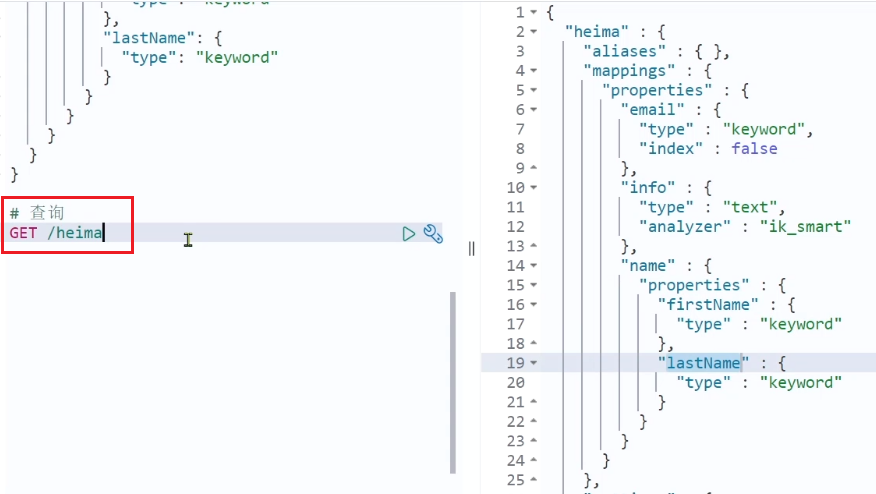
查询索引库
基本语法:
请求方式:GET
请求路径:/索引库名
请求参数:无
格式:
GET /索引库名
示例:
修改索引库
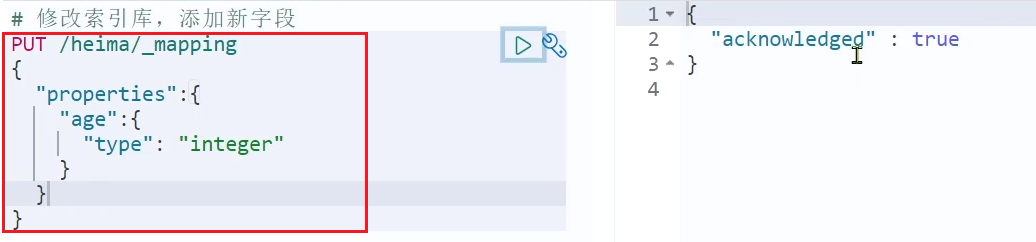
倒排索引结构虽然不复杂,但是一旦数据结构改变(比如改变了分词器),就需要重新创建倒排索引,这简直是灾难。因此索引库一旦创建,无法修改mapping
虽然无法修改mapping中已有的字段,但是却允许添加新的字段到mapping中,因为不会对倒排索引产生影响。
语法说明:
PUT /索引库名/_mapping
{
  "properties": {
    "新字段名":{
      "type": "integer"
    }
  }
}
示例:
删除索引库
语法:
请求方式:DELETE
请求路径:/索引库名
请求参数:无
格式:
DELETE /索引库名
文档的CRUD
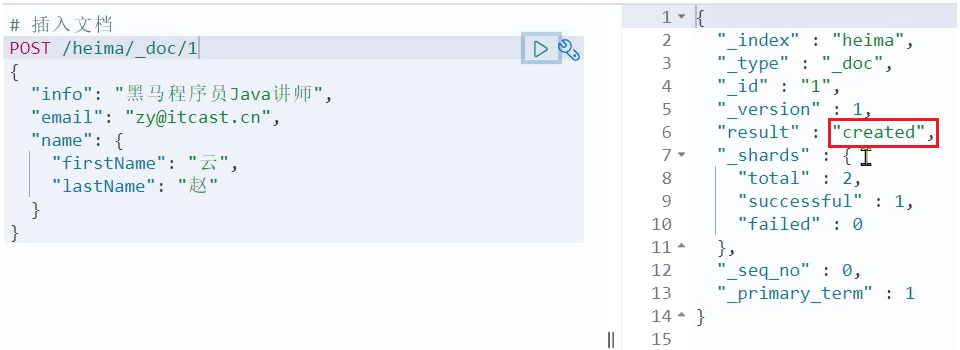
新增文档
语法:
POST /索引库名/_doc/文档id
{
    "字段1": "值1",
    "字段2": "值2",
    "字段3": {
        "子属性1": "值3",
        "子属性2": "值4"
    },
    // ...
}
示例:
POST /heima/_doc/1
{
    "info": "黑马程序员Java讲师",
    "email": "zy@itcast.cn",
    "name": {
        "firstName": "云",
        "lastName": "赵"
    }
}
响应:
查询文档
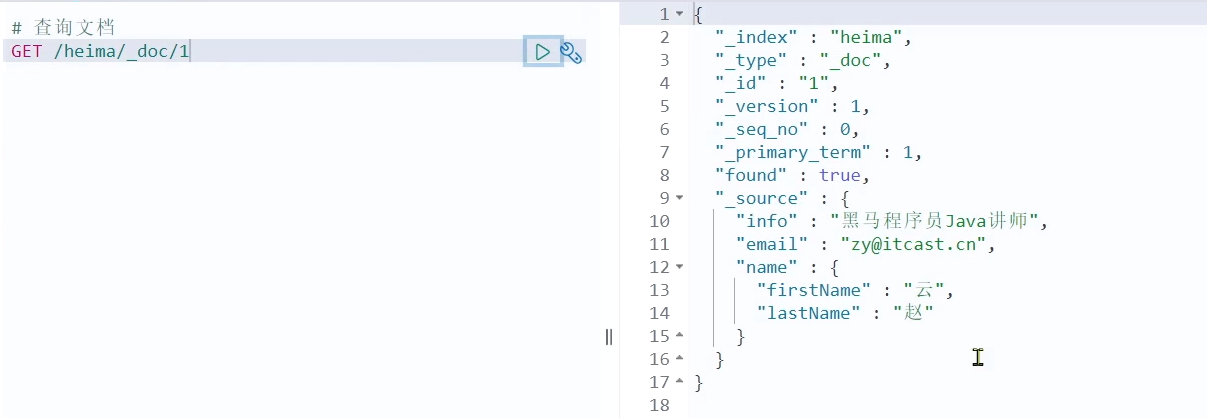
根据rest风格,新增是post,查询应该是get,不过查询一般都需要条件,这里我们把文档id带上。
语法:
GET /{索引库名称}/_doc/{id}
通过kibana查看数据:
GET /heima/_doc/1
查看结果:
删除文档
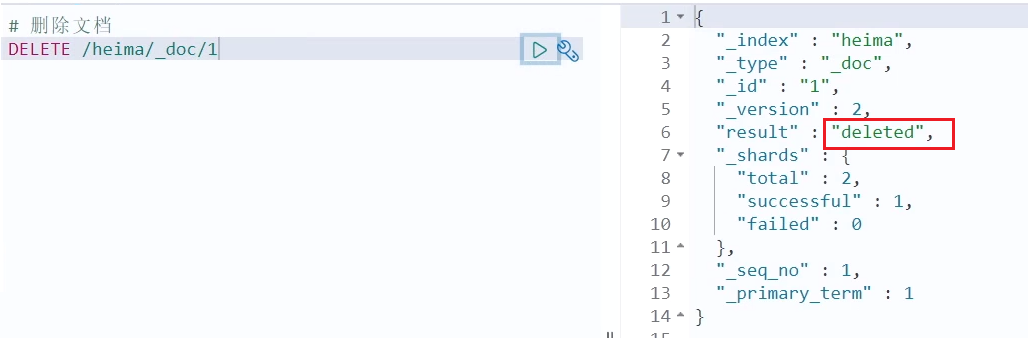
删除使用DELETE请求,同样,需要根据id进行删除:
语法:
DELETE /{索引库名}/_doc/id值
示例:
## 根据id删除数据
DELETE /heima/_doc/1
结果:
修改文档
修改有两种方式:
- 全量修改:直接覆盖原来的文档
- 增量修改:修改文档中的部分字段
全量修改
全量修改是覆盖原来的文档,其本质是:
- 根据指定的id删除文档
- 新增一个相同id的文档
注意:如果根据id删除时,id不存在,第二步的新增也会执行,也就从修改变成了新增操作了
语法:
PUT /{索引库名}/_doc/文档id
{
    "字段1": "值1",
    "字段2": "值2",
    // ... 略
}
示例:
PUT /heima/_doc/1
{
    "info": "黑马程序员高级Java讲师",
    "email": "zy@itcast.cn",
    "name": {
        "firstName": "云",
        "lastName": "赵"
    }
}
增量修改
增量修改是只修改指定id匹配的文档中的部分字段。
语法:
POST /{索引库名}/_update/文档id
{
    "doc": {
         "字段名": "新的值",
    }
}
示例:
POST /heima/_update/1
{
  "doc": {
    "email": "ZhaoYun@itcast.cn"
  }
}
总结
创建索引库:PUT /索引库名
查询索引库:GET /索引库名
删除索引库:DELETE /索引库名
添加字段:PUT /索引库名/_mapping
创建文档:POST /{索引库名}/_doc/文档id
查询文档:GET /{索引库名}/_doc/文档id
删除文档:DELETE /{索引库名}/_doc/文档id
修改文档:
- 全量修改:PUT /{索引库名}/_doc/文档id
- 增量修改:POST /{索引库名}/_update/文档id { "doc": {字段}}
搜索操作
查询所有:查询出所有数据,一般测试用。例如:match_all
全文检索(full text)查询:利用分词器对用户输入内容分词,然后去倒排索引库中匹配。例如:
- match_query
- multi_match_query
精确查询:根据精确词条值查找数据,一般是查找keyword、数值、日期、boolean等类型字段。例如:
- ids
- range
- term
地理(geo)查询:根据经纬度查询。例如:
- geo_distance
- geo_bounding_box
复合(compound)查询:复合查询可以将上述各种查询条件组合起来,合并查询条件。例如:
- bool
- function_score
查询的语法基本一致:
GET /indexName/_search
{
  "query": {
    "查询类型": {
      "查询条件": "条件值"
    }
  }
}
查询所有
- 查询类型为match_all
- 没有查询条件
// 查询所有
GET /indexName/_search
{
  "query": {
    "match_all": {
    }
  }
}
全文检索
全文检索查询的基本流程如下:
- 对用户搜索的内容做分词,得到词条
- 根据词条去倒排索引库中匹配,得到文档id
- 根据文档id找到文档,返回给用户
比较常用的场景包括:
- 商城的输入框搜索
- 百度输入框搜索
因为是拿着词条去匹配,因此参与搜索的字段也必须是可分词的text类型的字段
常见的全文检索查询包括:
match查询:单字段查询
GET /indexName/_search
{
  "query": {
    "match": {
      "FIELD": "TEXT"
    }
  }
}
multi_match查询:多字段查询,任意一个字段符合条件就算符合查询条件
GET /indexName/_search
{
  "query": {
    "multi_match": {
      "query": "TEXT",
      "fields": ["FIELD1", " FIELD12"]
    }
  }
}
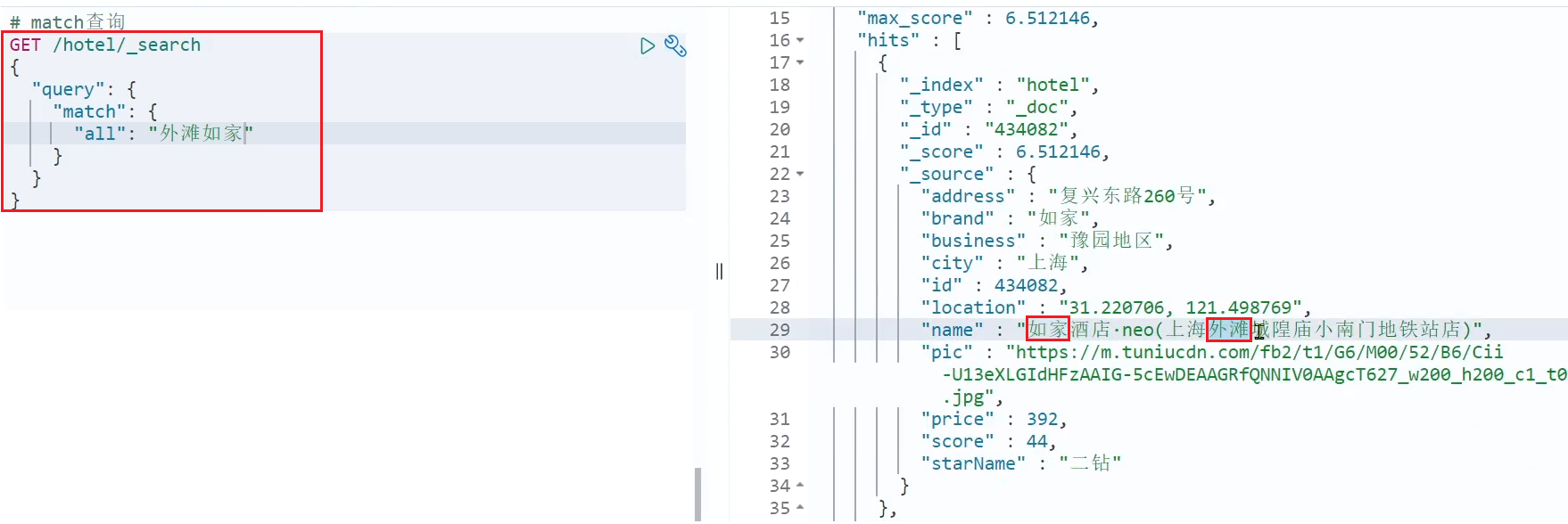
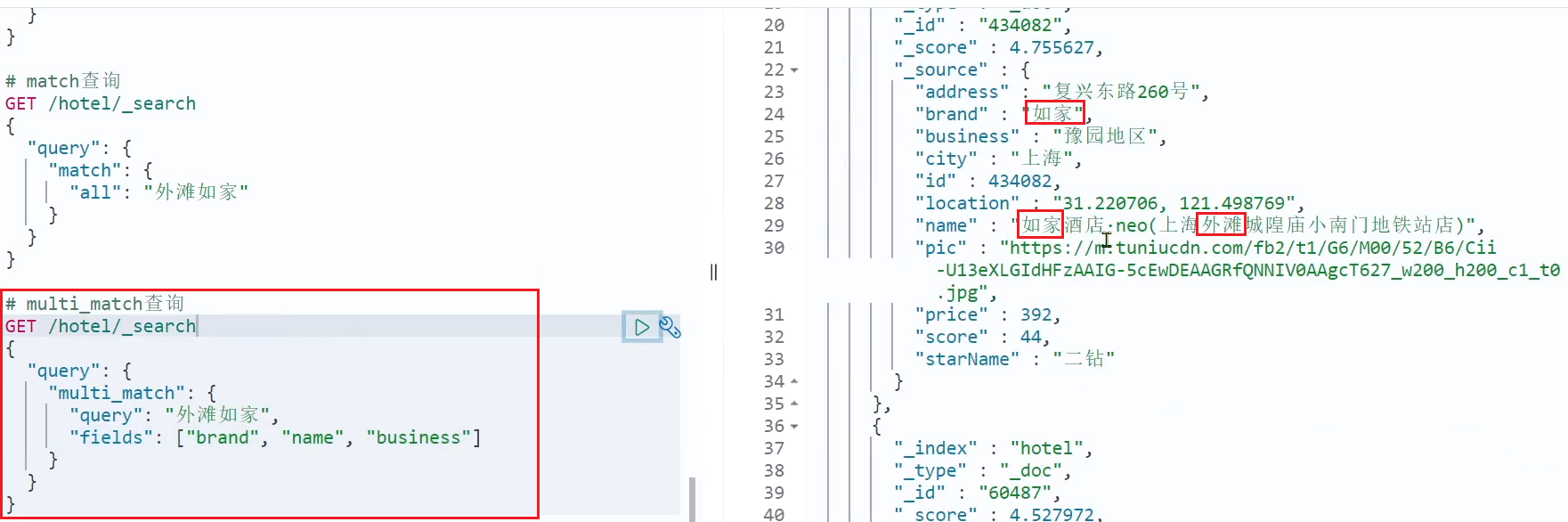
两种查询结果是一样,由于copy_to,但是,搜索字段越多,对查询性能影响越大,因此建议采用copy_to,然后单字段查询的方式
精确查询
精确查询一般是查找keyword、数值、日期、boolean等类型字段。所以不会对搜索条件分词。常见的有:
term:根据词条精确值查询
// term查询
GET /indexName/_search
{
  "query": {
    "term": {
      "FIELD": {
        "value": "VALUE"
      }
    }
  }
}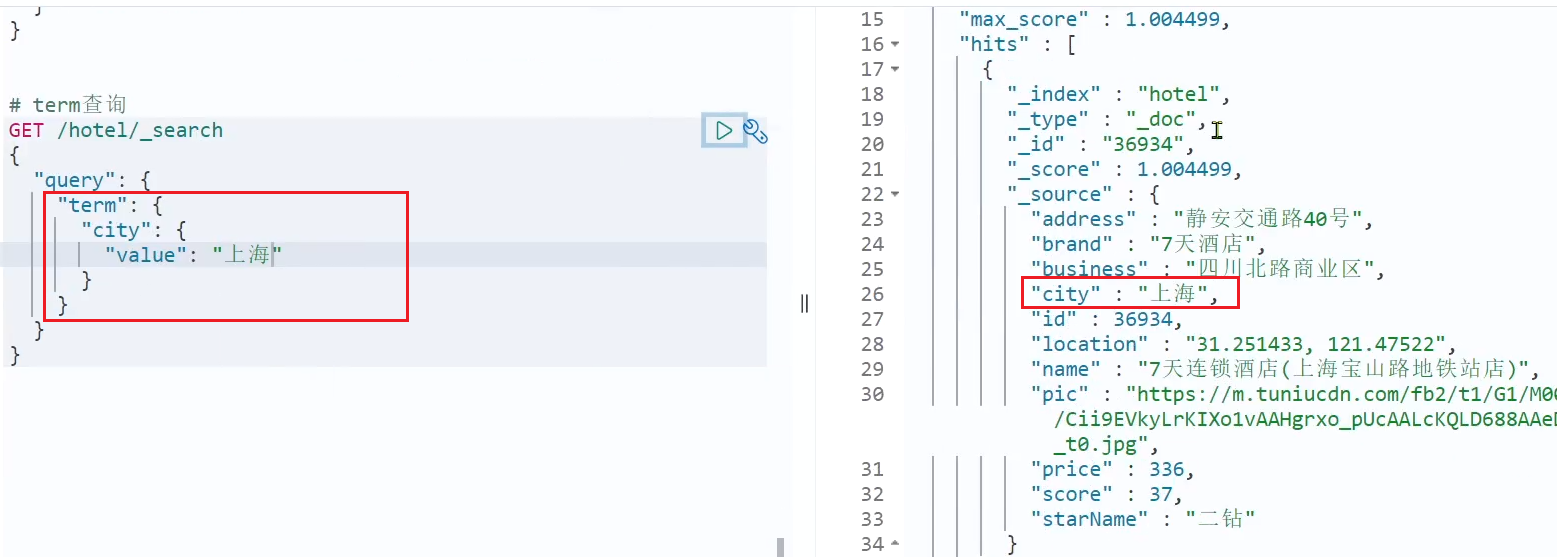
image-20221007205042359 range:根据值的范围查询
// range查询
GET /indexName/_search
{
  "query": {
    "range": {
      "FIELD": {
        "gte": 10, // 这里的gte代表大于等于,gt则代表大于
        "lte": 20 // lte代表小于等于,lt则代表小于
      }
    }
  }
}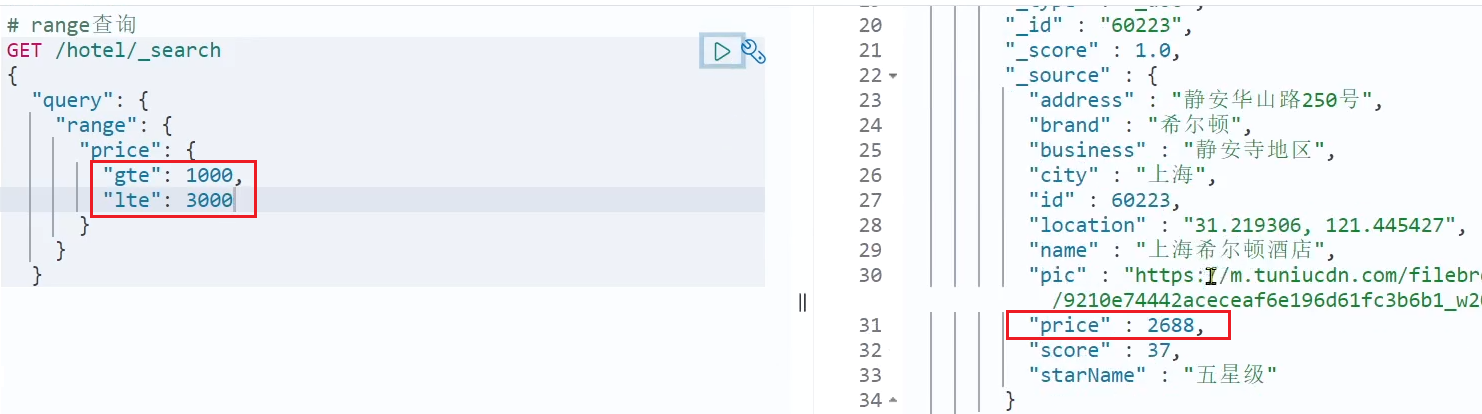
image-20221007205140401
地理坐标查询
常见的使用场景包括:
携程:搜索我附近的酒店
滴滴:搜索我附近的出租车
微信:搜索我附近的人
geo_bounding_box:矩形范围查询,查询坐标落在某个矩形范围的所有文档:
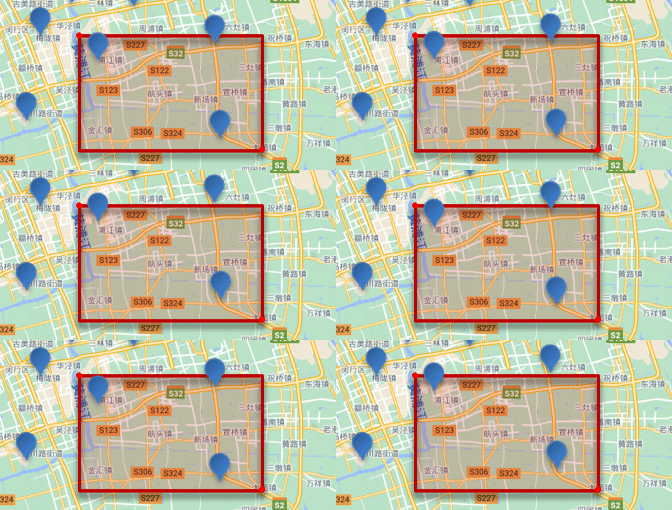
查询时,需要指定矩形的左上、右下两个点的坐标,然后画出一个矩形,落在该矩形内的都是符合条件的点
// geo_bounding_box查询
GET /indexName/_search
{
  "query": {
    "geo_bounding_box": {
      "FIELD": {
        "top_left": { // 左上点
          "lat": 31.1,
          "lon": 121.5
        },
        "bottom_right": { // 右下点
          "lat": 30.9,
          "lon": 121.7
        }
      }
    }
  }
}
geo_distance:附近查询,也叫做距离查询,查询到指定中心点小于某个距离值的所有文档
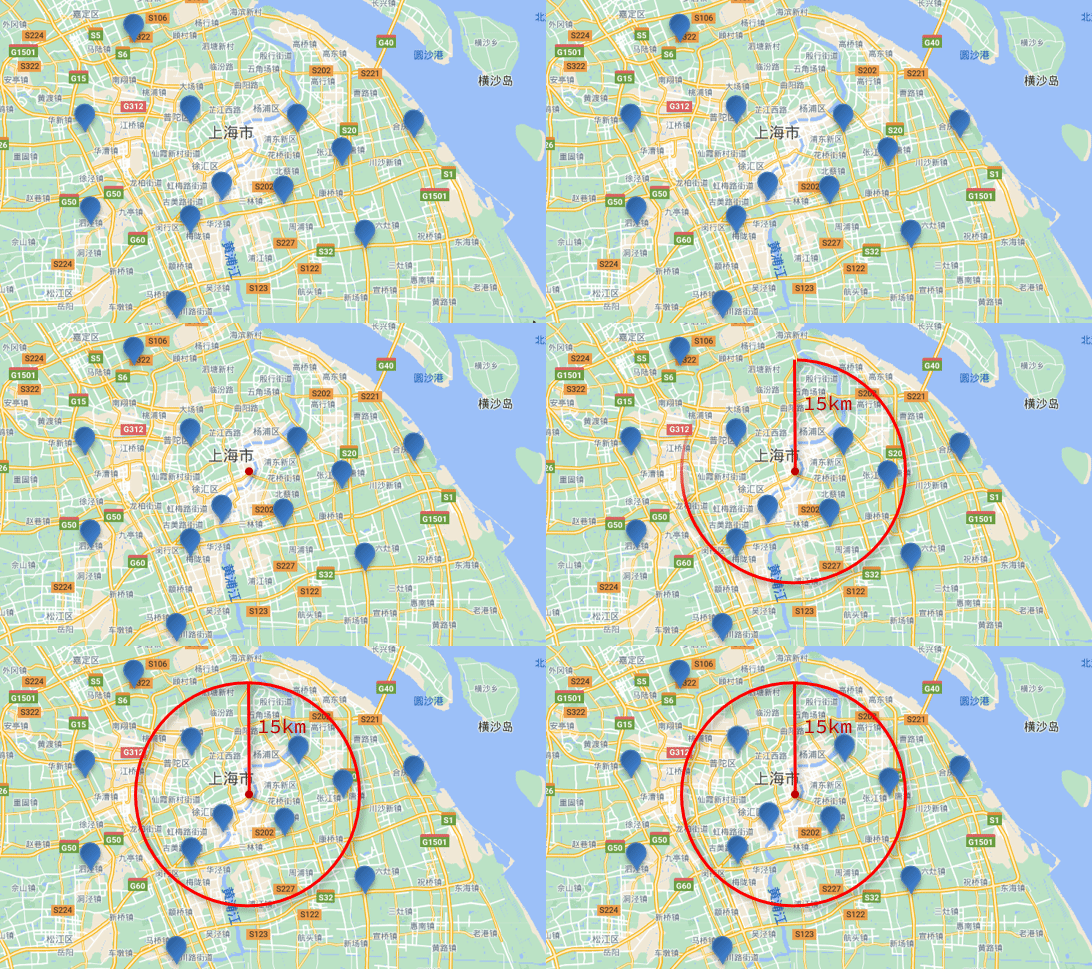
// geo_distance 查询
GET /indexName/_search
{
  "query": {
    "geo_distance": {
      "distance": "15km", // 半径
      "FIELD": "31.21,121.5" // 圆心
    }
  }
}
复合查询
相关性算分:当我们利用match查询时,文档结果会根据与搜索词条的关联度打分(_score),返回结果时按照分值降序排列
早期使用的打分算法是TF-IDF算法,公式如下:
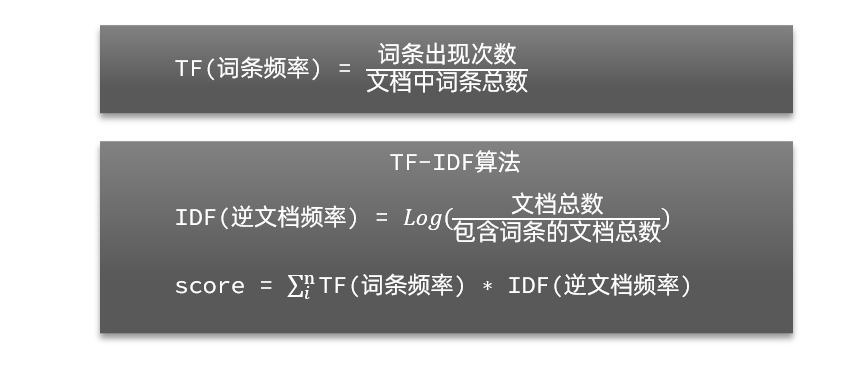
image-20210721190152134 在后来的5.1版本升级中,elasticsearch将算法改进为BM25算法,公式如下:
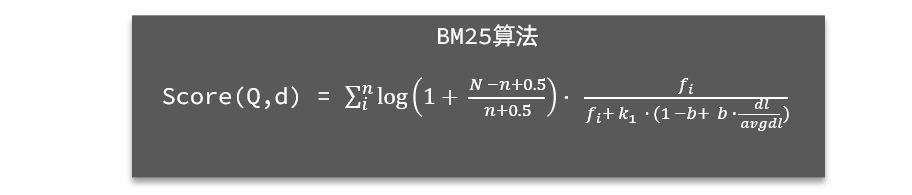
image-20210721190416214 TF-IDF算法有一各缺陷,就是词条频率越高,文档得分也会越高,单个词条对文档影响较大。而BM25则会让单个词条的算分有一个上限,曲线更加平滑:
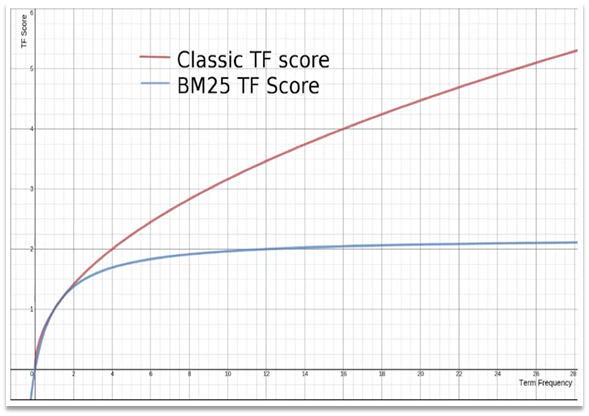
image-20210721190907320 function_score: 算分函数查询,四部分组成
原始查询条件:query部分,基于这个条件搜索文档,并且基于BM25算法给文档打分,原始算分(query score)
过滤条件:filter部分,符合该条件的文档才会重新算分
算分函数:符合filter条件的文档要根据这个函数做运算,得到的函数算分(function score),有四种函数
- weight:函数结果是常量
- field_value_factor:以文档中的某个字段值作为函数结果
- random_score:以随机数作为函数结果
- script_score:自定义算分函数算法
运算模式:算分函数的结果、原始查询的相关性算分,两者之间的运算方式,包括:
- multiply:相乘
- replace:用function score替换query score
- 其它,例如:sum、avg、max、min
function score的运行流程如下:
- 1)根据原始条件查询搜索文档,并且计算相关性算分,称为原始算分(query score)
- 2)根据过滤条件,过滤文档
- 3)符合过滤条件的文档,基于算分函数运算,得到函数算分(function score)
- 4)将原始算分(query score)和函数算分(function score)基于运算模式做运算,得到最终结果,作为相关性算分
GET /hotel/_search { "query": { "function_score": { "query": { .... }, // 原始查询,可以是任意条件 "functions": [ // 算分函数 { "filter": { // 满足的条件,品牌必须是如家 "term": { "brand": "如家" } }, "weight": 2 // 算分权重为2 } ], "boost_mode": "sum" // 加权模式,求和 } } }bool:布尔查询,是一个或多个查询子句的组合,每一个子句就是一个子查询。子查询的组合方式有:
- must:必须匹配每个子查询,类似“与”
- should:选择性匹配子查询,类似“或”
- must_not:必须不匹配,不参与算分,类似“非”,常用在不大于...
- filter:必须匹配,不参与算分,类似“与”,常用于大于...
每一个不同的字段,其查询的条件、方式都不一样,必须是多个不同的查询,而要组合这些查询,就必须用bool查询了。
需要注意的是,搜索时,参与打分的字段越多,查询的性能也越差。因此这种多条件查询时,建议这样做:
- 搜索框的关键字搜索,是全文检索查询,使用must查询,参与算分
- 其它过滤条件,采用filter查询。不参与算分
GET /hotel/_search
{
  "query": {
    "bool": {
      "must": [
        {"term": {"city": "上海" }}
      ],
      "should": [
        {"term": {"brand": "皇冠假日" }},
        {"term": {"brand": "华美达" }}
      ],
      "must_not": [
        { "range": { "price": { "lte": 500 } }}
      ],
      "filter": [
        { "range": {"score": { "gte": 45 } }}
      ]
    }
  }
}
结果处理
排序
默认是根据相关度算分(_score)来排序,但是也支持自定义方式对搜索结果排序。可以排序字段类型有:keyword类型、数值类型、地理坐标类型、日期类型等
普通字段排序
排序条件是一个数组,也就是可以写多个排序条件。按照声明的顺序,当第一个条件相等时,再按照第二个条件排序,以此类推
GET /indexName/_search
{
  "query": {
    "match_all": {}
  },
  "sort": [
    {
      "FIELD": "desc"  // 排序字段、排序方式ASC、DESC
    }
  ]
}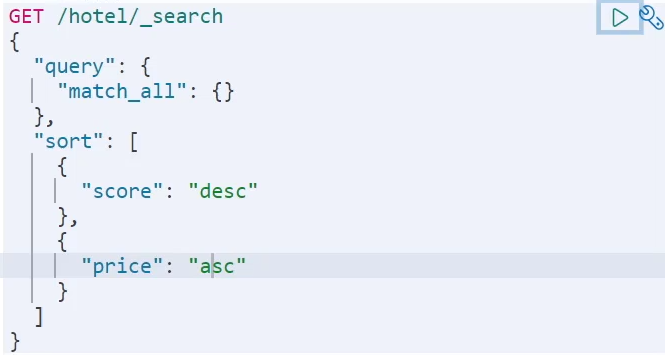
image-20221007211039471 地理坐标排序
结果返回的sort就是距离目标点的距离
获取你的位置的经纬度的方式:https://lbs.amap.com/demo/jsapi-v2/example/map/click-to-get-lnglat/
GET /indexName/_search
{
  "query": {
    "match_all": {}
  },
  "sort": [
    {
      "_geo_distance" : {
          "FIELD" : "纬度,经度", // 文档中geo_point类型的字段名、目标坐标点
          "order" : "asc", // 排序方式
          "unit" : "km" // 排序的距离单位
      }
    }
  ]
}
分页
elasticsearch 默认情况下只返回top10的数据。而如果要查询更多数据就需要修改分页参数了。elasticsearch中通过修改from、size参数来控制要返回的分页结果:
- from:从第几个文档开始
- size:总共查询几个文档
类似于mysql中的limit ?, ?
基本分页
GET /hotel/_search
{
  "query": {
    "match_all": {}
  },
  "from": 0, // 分页开始的位置,默认为0
  "size": 10, // 期望获取的文档总数
  "sort": [
    {"price": "asc"}
  ]
}
深度分页存在的问题
- 我要查询990~1000的数据,查询逻辑要这么写:
GET /hotel/_search
{
  "query": {
    "match_all": {}
  },
  "from": 990, // 分页开始的位置,默认为0
  "size": 10, // 期望获取的文档总数
  "sort": [
    {"price": "asc"}
  ]
}
这里是查询990开始的数据,也就是 第990~第1000条 数据
不过,elasticsearch内部分页时,必须先查询 0~1000条,然后截取其中的990 ~ 1000的这10条:

image-20210721200643029 查询TOP1000,如果es是单点模式,这并无太大影响
但是elasticsearch将来一定是集群,例如我集群有5个节点,我要查询TOP1000的数据,并不是每个节点查询200条就可以了
因为节点A的TOP200,在另一个节点可能排到10000名以外了
因此要想获取整个集群的TOP1000,必须先查询出每个节点的TOP1000,汇总结果后,重新排名,重新截取TOP1000
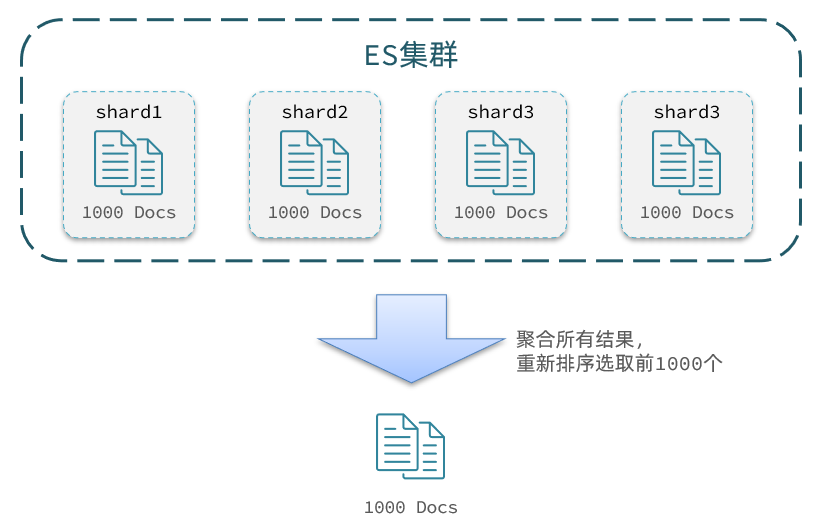
image-20210721201003229 那如果我要查询9900~10000的数据呢?是不是要先查询TOP10000呢?那每个节点都要查询10000条?汇总到内存中?
当查询分页深度较大时,汇总数据过多,对内存和CPU会产生非常大的压力,因此elasticsearch会禁止from+ size 超过10000的请求
针对深度分页,ES提供了两种解决方案,官方文档:
search after:分页时需要排序,原理是从上一次的排序值开始,查询下一页数据。官方推荐使用的方式
- 存在的问题,只能往后查,往前查仍然需要排序
scroll:原理将排序后的文档id形成快照,保存在内存。官方已经不推荐使用
高亮
- 原理
- 给文档中的所有关键字都添加一个标签,例如
<em>标签 - 页面给
<em>标签编写CSS样式
- 给文档中的所有关键字都添加一个标签,例如
GET /hotel/_search
{
  "query": {
    "match": {
      "FIELD": "TEXT" // 查询条件,高亮一定要使用全文检索查询
    }
  },
  "highlight": {
    "fields": { // 指定要高亮的字段
      "FIELD": {
        "pre_tags": "<em>",  // 用来标记高亮字段的前置标签
        "post_tags": "</em>" // 用来标记高亮字段的后置标签
      }
    }
  }
}
注意:
- 高亮是对关键字高亮,因此搜索条件必须带有关键字,而不能是范围这样的查询。
- 默认情况下,高亮的字段,必须与搜索指定的字段一致,否则无法高亮
- 如果要对非搜索字段高亮,则需要添加一个属性:required_field_match=false
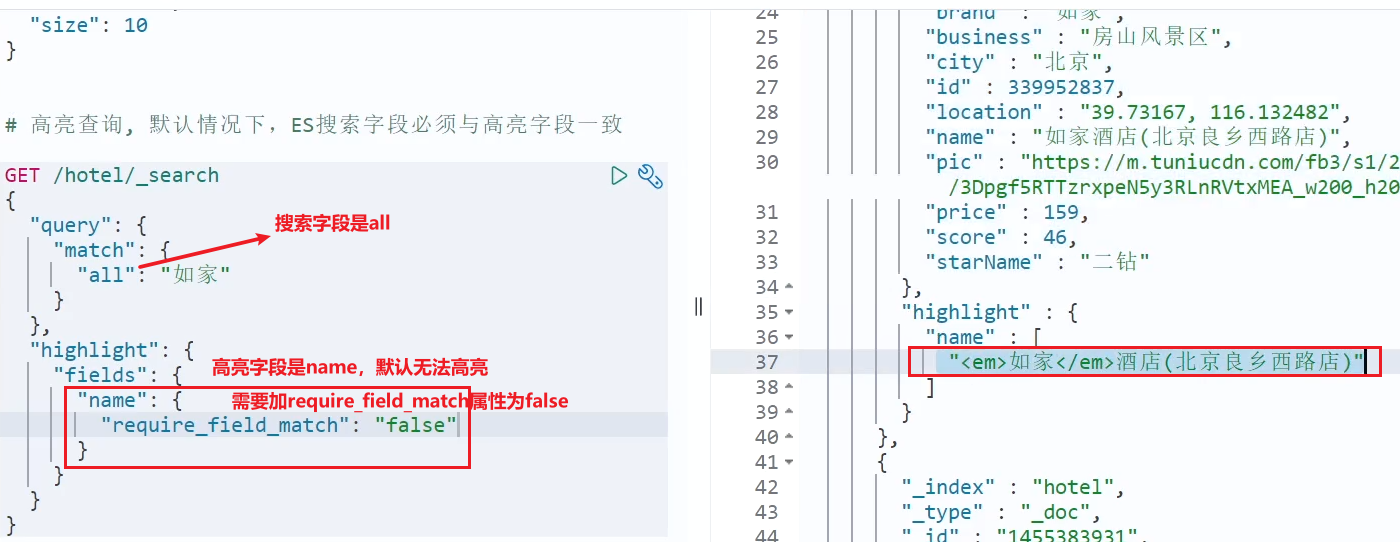
总结
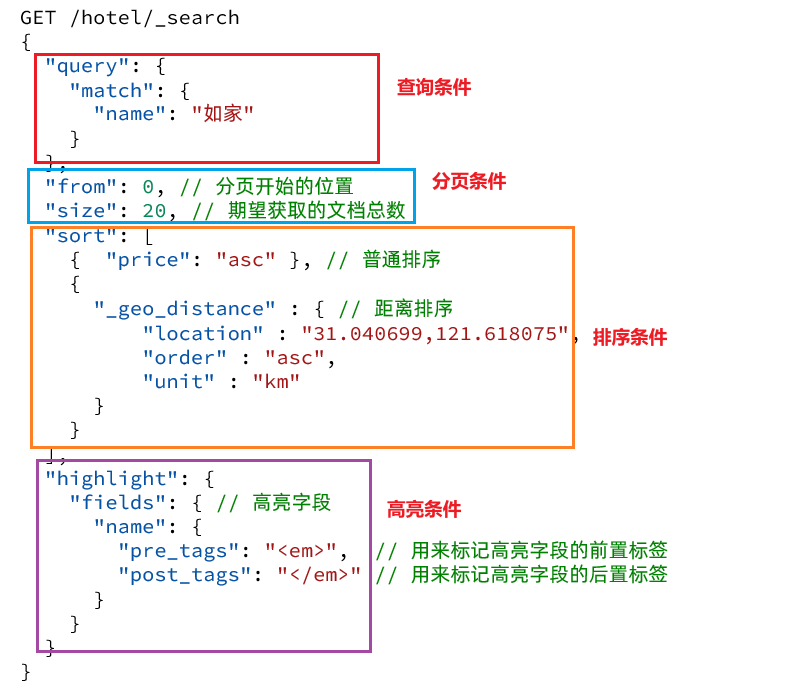
查询的DSL是一个大的JSON对象,包含下列属性:
- query:查询条件
- from和size:分页条件
- sort:排序条件
- highlight:高亮条件
示例:
数据聚合
**聚合(aggregations)**可以让我们极其方便的实现对数据的统计、分析、运算
种类
- **桶(Bucket)**聚合:用来对文档做分组
- TermAggregation:按照文档字段值分组,例如按照品牌值分组、按照国家分组
- Date Histogram:按照日期阶梯分组,例如一周为一组,或者一月为一组
- **度量(Metric)**聚合:用以计算一些值,比如:最大值、最小值、平均值等
- Avg:求平均值
- Max:求最大值
- Min:求最小值
- Stats:同时求max、min、avg、sum等
- **管道(pipeline)**聚合:其它聚合的结果为基础做聚合
**注意:**参加聚合的字段必须是keyword、日期、数值、布尔类型
- **桶(Bucket)**聚合:用来对文档做分组
Bucket聚合
GET /hotel/_search
{
  "size": 0,  // 设置size为0,结果中不包含文档,只包含聚合结果
  "aggs": { // 定义聚合
    "brandAgg": { //给聚合起个名字
      "terms": { // 聚合的类型,按照品牌值聚合,所以选择term
        "field": "brand", // 参与聚合的字段
        "size": 20 // 希望获取的聚合结果数量
      }
    }
  }
}
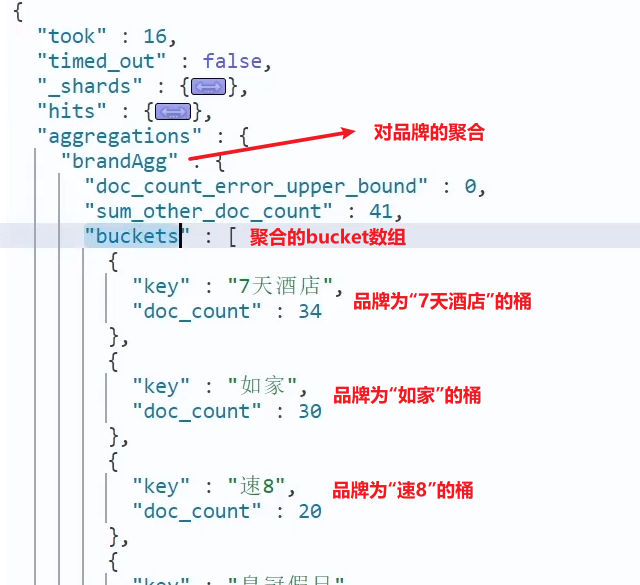
对聚合结果排序
默认情况下,Bucket聚合会统计Bucket内的文档数量,记为_count,并且按照_count降序排序。
我们可以指定order属性,自定义聚合的排序方式
GET /hotel/_search
{
  "size": 0,
  "aggs": {
    "brandAgg": {
      "terms": {
        "field": "brand",
        "order": {
          "_count": "asc" // 按照_count升序排列
        },
        "size": 20
      }
    }
  }
}
限定聚合范围
默认情况下,Bucket聚合是对索引库的所有文档做聚合,但真实场景下,用户会输入搜索条件,因此聚合必须是对搜索结果聚合。那么聚合必须添加限定条件
我们可以限定要聚合的文档范围,只要添加query条件即可,聚合得到的品牌明显变少了
GET /hotel/_search
{
  "query": {
    "range": {
      "price": {
        "lte": 200 // 只对200元以下的文档聚合
      }
    }
  },
  "size": 0,
  "aggs": {
    "brandAgg": {
      "terms": {
        "field": "brand",
        "size": 20
      }
    }
  }
}
Metric聚合
对桶内的文档做运算,获取每个的min、max、avg等值
这就要用到Metric聚合了,例如stat聚合:就可以获取min、max、avg等结果
GET /hotel/_search
{
  "size": 0,
  "aggs": {
    "brandAgg": {
      "terms": {
        "field": "brand",
        "size": 20
      },
      "aggs": { // 是brands聚合的子聚合,也就是分组后对每组分别计算
        "score_stats": { // 聚合名称
          "stats": { // 聚合类型,这里stats可以计算min、max、avg等
            "field": "score" // 聚合字段,这里是score
          }
        }
      }
    }
  }
}
这次的score_stats聚合是在brandAgg的聚合内部嵌套的子聚合。因为我们需要在每个桶分别计算
另外,我们还可以给聚合结果做个排序,例如按照每个桶的酒店平均分做排序
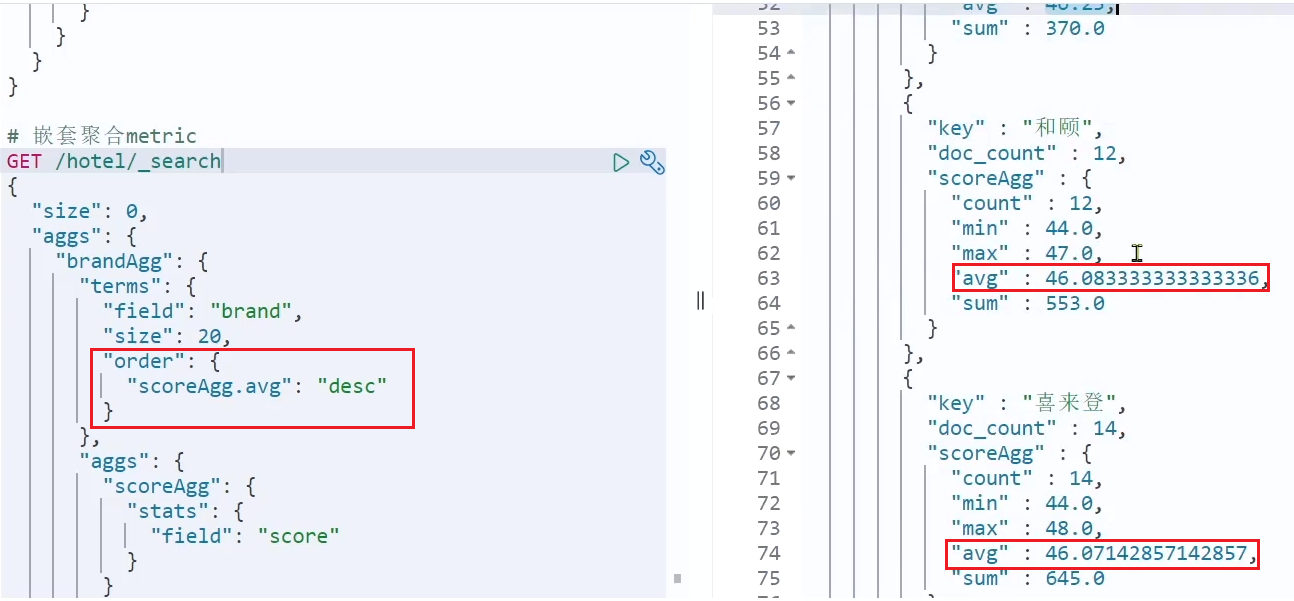
自动补全
elasticsearch提供了Completion Suggester查询来实现自动补全功能。这个查询会匹配以用户输入内容开头的词条并返回。为了提高补全查询的效率,对于文档中字段的类型有一些约束:
参与补全查询的字段必须是completion类型。
字段的内容一般是用来补全的多个词条形成的数组。
比如,一个这样的索引库:
// 创建索引库
PUT test
{
  "mappings": {
    "properties": {
      "title":{
        "type": "completion"
      }
    }
  }
}
然后插入下面的数据:
// 示例数据
POST test/_doc
{
  "title": ["Sony", "WH-1000XM3"]
}
POST test/_doc
{
  "title": ["SK-II", "PITERA"]
}
POST test/_doc
{
  "title": ["Nintendo", "switch"]
}
查询的DSL语句如下:
// 自动补全查询
GET /test/_search
{
  "suggest": {
    "title_suggest": {	//名字随便起
      "text": "s", // 要补全的关键字
      "completion": {	//补全方式
        "field": "title", // 补全查询的字段
        "skip_duplicates": true, // 跳过重复的
        "size": 10 // 获取前10条结果
      }
    }
  }
}
RestClient操作
准备工作
mysql结构
CREATE DATABASE heima;
USE heima;
CREATE TABLE `tb_hotel` (
  `id` bigint(20) NOT NULL COMMENT '酒店id',
  `name` varchar(255) NOT NULL COMMENT '酒店名称;例:7天酒店',
  `address` varchar(255) NOT NULL COMMENT '酒店地址;例:航头路',
  `price` int(10) NOT NULL COMMENT '酒店价格;例:329',
  `score` int(2) NOT NULL COMMENT '酒店评分;例:45,就是4.5分',
  `brand` varchar(32) NOT NULL COMMENT '酒店品牌;例:如家',
  `city` varchar(32) NOT NULL COMMENT '所在城市;例:上海',
  `star_name` varchar(16) DEFAULT NULL COMMENT '酒店星级,从低到高分别是:1星到5星,1钻到5钻',
  `business` varchar(255) DEFAULT NULL COMMENT '商圈;例:虹桥',
  `latitude` varchar(32) NOT NULL COMMENT '纬度;例:31.2497',
  `longitude` varchar(32) NOT NULL COMMENT '经度;例:120.3925',
  `pic` varchar(255) DEFAULT NULL COMMENT '酒店图片;例:/img/1.jpg',
  PRIMARY KEY (`id`)
) ENGINE=InnoDB DEFAULT CHARSET=utf8mb4;
导入工程
- 修改配置文件 --- mysql
mapping映射分析
创建索引库,最关键的是mapping映射,而mapping映射要考虑的信息包括:
- 字段名
- 字段数据类型
- 是否参与搜索
- 是否需要分词
- 分词器是什么
其中:
- 字段名、字段数据类型,可以参考数据表结构的名称和类型
- 是否参与搜索要分析业务来判断,例如图片地址,就无需参与搜索
- 是否分词呢要看内容,内容如果是一个整体就无需分词,反之则要分词
- 分词器,我们可以统一使用ik_max_word
索引库结构如下:
PUT /hotel
{
  "mappings": {
    "properties": {
      "id": {
        "type": "keyword"
      },
      "name":{
        "type": "text",
        "analyzer": "ik_max_word",
        "copy_to": "all"
      },
      "address":{
        "type": "keyword",
        "index": false
      },
      "price":{
        "type": "integer"
      },
      "score":{
        "type": "integer"
      },
      "brand":{
        "type": "keyword",
        "copy_to": "all"
      },
      "city":{
        "type": "keyword",
        "copy_to": "all"
      },
      "starName":{
        "type": "keyword"
      },
      "business":{
        "type": "keyword"
      },
      "location":{
        "type": "geo_point"
      },
      "pic":{
        "type": "keyword",
        "index": false
      },
      "all":{
        "type": "text",
        "analyzer": "ik_max_word"
      }
    }
  }
}
初始化RestClient
在elasticsearch提供的API中,与elasticsearch一切交互都封装在一个名为RestHighLevelClient的类中,必须先完成这个对象的初始化,建立与elasticsearch的连接
依赖
<dependency>
    <groupId>org.elasticsearch.client</groupId>
    <artifactId>elasticsearch-rest-high-level-client</artifactId>
</dependency>
SpringBoot默认的ES版本与需要的不一致,所以我们需要覆盖默认的ES版本
<properties>
    <elasticsearch.version>7.12.1</elasticsearch.version>
</properties>
初始化RestHighLevelClient
RestHighLevelClient client = new RestHighLevelClient(RestClient.builder(
        HttpHost.create("http://192.168.150.101:9200")
));
CRUD操作
索引库的CURD
创建索引库
创建Request对象。因为是创建索引库的操作,因此Request是CreateIndexRequest
添加请求参数,其实就是DSL的JSON参数部分。因为json字符串很长,这里是定义了静态字符串常量MAPPING_TEMPLATE,让代码看起来更加优雅
发送请求,client.indices()方法的返回值是IndicesClient类型,封装了所有与索引库操作有关的方法
package cn.itcast.hotel.constants;

public class HotelConstants {
    public static final String MAPPING_TEMPLATE = "{\n" +
            "  \"mappings\": {\n" +
            "    \"properties\": {\n" +
            "      \"id\": {\n" +
            "        \"type\": \"keyword\"\n" +
            "      },\n" +
            "      \"name\":{\n" +
            "        \"type\": \"text\",\n" +
            "        \"analyzer\": \"ik_max_word\",\n" +
            "        \"copy_to\": \"all\"\n" +
            "      },\n" +
            "      \"address\":{\n" +
            "        \"type\": \"keyword\",\n" +
            "        \"index\": false\n" +
            "      },\n" +
            "      \"price\":{\n" +
            "        \"type\": \"integer\"\n" +
            "      },\n" +
            "      \"score\":{\n" +
            "        \"type\": \"integer\"\n" +
            "      },\n" +
            "      \"brand\":{\n" +
            "        \"type\": \"keyword\",\n" +
            "        \"copy_to\": \"all\"\n" +
            "      },\n" +
            "      \"city\":{\n" +
            "        \"type\": \"keyword\",\n" +
            "        \"copy_to\": \"all\"\n" +
            "      },\n" +
            "      \"starName\":{\n" +
            "        \"type\": \"keyword\"\n" +
            "      },\n" +
            "      \"business\":{\n" +
            "        \"type\": \"keyword\"\n" +
            "      },\n" +
            "      \"location\":{\n" +
            "        \"type\": \"geo_point\"\n" +
            "      },\n" +
            "      \"pic\":{\n" +
            "        \"type\": \"keyword\",\n" +
            "        \"index\": false\n" +
            "      },\n" +
            "      \"all\":{\n" +
            "        \"type\": \"text\",\n" +
            "        \"analyzer\": \"ik_max_word\"\n" +
            "      }\n" +
            "    }\n" +
            "  }\n" +
            "}";
}
@Test
void createHotelIndex() throws IOException {
    // 1.创建Request对象,对应PUT /hotel
    CreateIndexRequest request = new CreateIndexRequest("hotel");
    // 2.准备请求的参数:DSL语句
    request.source(MAPPING_TEMPLATE, XContentType.JSON);
    // 3.发送请求
    client.indices().create(request, RequestOptions.DEFAULT);
}
删除索引库
@Test
void testDeleteHotelIndex() throws IOException {
    // 1.创建Request对象,对应DELETE /hotel
    DeleteIndexRequest request = new DeleteIndexRequest("hotel");
    // 2.发送请求
    client.indices().delete(request, RequestOptions.DEFAULT);
}
判断索引库是否存在
@Test
void testExistsHotelIndex() throws IOException {
    // 1.创建Request对象,对应GET /hotel
    GetIndexRequest request = new GetIndexRequest("hotel");
    // 2.发送请求
    boolean exists = client.indices().exists(request, RequestOptions.DEFAULT);
    // 3.输出
    System.err.println(exists ? "索引库已经存在!" : "索引库不存在!");
}
文档的CRUD
索引库实体类
- 对应数据库
@Data
@TableName("tb_hotel")
public class Hotel {
    @TableId(type = IdType.INPUT)
    private Long id;
    private String name;
    private String address;
    private Integer price;
    private Integer score;
    private String brand;
    private String city;
    private String starName;
    private String business;
    private String longitude;
    private String latitude;
    private String pic;
}
- 对应索引库
@Data
@NoArgsConstructor
public class HotelDoc {
    private Long id;
    private String name;
    private String address;
    private Integer price;
    private Integer score;
    private String brand;
    private String city;
    private String starName;
    private String business;
    private String location;
    private String pic;

    public HotelDoc(Hotel hotel) {
        this.id = hotel.getId();
        this.name = hotel.getName();
        this.address = hotel.getAddress();
        this.price = hotel.getPrice();
        this.score = hotel.getScore();
        this.brand = hotel.getBrand();
        this.city = hotel.getCity();
        this.starName = hotel.getStarName();
        this.business = hotel.getBusiness();
        this.location = hotel.getLatitude() + ", " + hotel.getLongitude();
        this.pic = hotel.getPic();
    }
}
新增文档
创建Request对象
准备请求参数,也就是DSL中的JSON文档
发送请求
变化的地方在于,这里直接使用client.xxx()的API,不再需要client.indices()
@Test
void testAddDocument() throws IOException {
    // 1.根据id查询酒店数据
    Hotel hotel = hotelService.getById(61083L);
    // 2.转换为文档类型
    HotelDoc hotelDoc = new HotelDoc(hotel);
    // 3.将HotelDoc转json
    String json = JSON.toJSONString(hotelDoc);

    // 1.准备Request对象,对应POST /{索引库名}/_doc/61081
    IndexRequest request = new IndexRequest("hotel").id(hotelDoc.getId().toString());
    // 2.准备Json文档,对应{"name":"如家","address":"上海市",....}
    request.source(json, XContentType.JSON);
    // 3.发送请求
    client.index(request, RequestOptions.DEFAULT);
}
查询文档
@Test
void testGetDocumentById() throws IOException {
    // 1.准备Request,对应GET /hotel/_doc/{id}
    GetRequest request = new GetRequest("hotel", "61083");
    // 2.发送请求,得到响应
    GetResponse response = client.get(request, RequestOptions.DEFAULT);
    // 3.解析响应结果
    String json = response.getSourceAsString();

    HotelDoc hotelDoc = JSON.parseObject(json, HotelDoc.class);
    System.out.println(hotelDoc);
}
删除文档
@Test
void testDeleteDocument() throws IOException {
    // 1.准备Request,对应DELETE /hotel/_doc/{id}
    DeleteRequest request = new DeleteRequest("hotel", "61083");
    // 2.发送请求
    client.delete(request, RequestOptions.DEFAULT);
}
修改文档
- 全量修改和新增相同
- 增量修改
@Test
void testUpdateDocument() throws IOException {
    // 1.准备Request,对应POST /hotel/_update/{id}
    UpdateRequest request = new UpdateRequest("hotel", "61083");
    // 2.准备请求参数
    request.doc(
        "price", "952",
        "starName", "四钻"
    );
    // 3.发送请求
    client.update(request, RequestOptions.DEFAULT);
}
批量操作
批量处理BulkRequest,有一个add(),添加请求
- IndexRequest,也就是新增
- UpdateRequest,也就是修改
- DeleteRequest,也就是删除
@Test
void testBulkRequest() throws IOException {
    // 批量查询酒店数据
    List<Hotel> hotels = hotelService.list();

    // 1.创建Request
    BulkRequest request = new BulkRequest();
    // 2.准备参数,添加多个新增的Request
    for (Hotel hotel : hotels) {
        // 2.1.转换为文档类型HotelDoc
        HotelDoc hotelDoc = new HotelDoc(hotel);
        // 2.2.创建新增文档的Request对象
        request.add(new IndexRequest("hotel")
                    .id(hotelDoc.getId().toString())
                    .source(JSON.toJSONString(hotelDoc), XContentType.JSON));
    }
    // 3.发送请求
    client.bulk(request, RequestOptions.DEFAULT);
}
总结
JavaRestClient操作elasticsearch的流程基本类似。核心是client.indices()方法来获取索引库的操作对象。
索引库操作的基本步骤:
- 初始化RestHighLevelClient
- 创建XxxIndexRequest。XXX是Create、Get、Delete
- 准备DSL( Create时需要,其它是无参)
- 发送请求,调用RestHighLevelClient#indices().xxx()方法,xxx是create、exists、delete
文档操作的基本步骤:
- 初始化RestHighLevelClient
- 创建XxxRequest。XXX是Index、Get、Update、Delete、Bulk
- 准备参数(Index、Update、Bulk时需要)
- 发送请求。调用RestHighLevelClient#.xxx()方法,xxx是index、get、update、delete、bulk
- 解析结果(Get时需要)
搜索 & 结果处理
发起请求步骤
创建
SearchRequest对象,指定索引库名准备Request.source(),也就是DSL
- 利用_
request.source()_构建DSL,DSL中可以包含查询、分页、排序、高亮等 - 利用_
QueryBuilders_包含match、term、function_score、bool等各种查询,如matchAllQuery()构建一个match_all查询的DSL - 传入request.source() 的
query()方法
- 利用_
利用client.search()发送请求,得到响应
解析响应步骤
hits:命中的结果total:总条数,其中的value是具体的总条数值max_score:所有结果中得分最高的文档的相关性算分hits:搜索结果的文档数组,其中的每个文档都是一个json对象_source:文档中的原始数据,也是json对象
因此,我们解析响应结果,就是逐层解析JSON字符串,流程如下:
SearchHits:通过response.getHits()获取,就是JSON中的最外层的hits,代表命中的结果SearchHits#getTotalHits().value:获取总条数信息SearchHits#getHits():获取SearchHit数组,也就是文档数组SearchHit#getSourceAsString():获取文档结果中的_source,也就是原始的json文档数据
查询所有
- QueryBuilders.matchAllQuery() --- 对应 match_all
@Test
void testMatchAll() throws IOException {
    // 1.准备Request
    SearchRequest request = new SearchRequest("hotel");
    // 2.准备DSL
    request.source()
        .query(QueryBuilders.matchAllQuery());
    // 3.发送请求
    SearchResponse response = client.search(request, RequestOptions.DEFAULT);

    // 4.解析响应
    handleResponse(response);
}

private void handleResponse(SearchResponse response) {
    // 4.解析响应
    SearchHits searchHits = response.getHits();
    // 4.1.获取总条数
    long total = searchHits.getTotalHits().value;
    System.out.println("共搜索到" + total + "条数据");
    // 4.2.文档数组
    SearchHit[] hits = searchHits.getHits();
    // 4.3.遍历
    for (SearchHit hit : hits) {
        // 获取文档source
        String json = hit.getSourceAsString();
        // 反序列化
        HotelDoc hotelDoc = JSON.parseObject(json, HotelDoc.class);
        System.out.println("hotelDoc = " + hotelDoc);
    }
}
全文检索
- QueryBuilders.matchQuery() --- 对应 match
- QueryBuilders.matchQuery() --- 对应 multi_match
@Test
void testMatch() throws IOException {
    // 1.准备Request
    SearchRequest request = new SearchRequest("hotel");
    // 2.准备DSL
    request.source()
        .query(QueryBuilders.matchQuery("all", "如家"));
							//QueryBuilders.multiMatchQuery("如家","name","busness")
    // 3.发送请求
    SearchResponse response = client.search(request, RequestOptions.DEFAULT);
    // 4.解析响应
    handleResponse(response);
}
精确查询
- QueryBuilders.termQuery("city","杭州") --- 对应 term
- QueryBuilders.rangeQuery("price").gte(100).lte(150) --- 对应 range
布尔查询
- QueryBuilders.boolQuery()返回BoolQueryBuilder,添加条件 --- 对应 bool
@Test
void testBool() throws IOException {
    // 1.准备Request
    SearchRequest request = new SearchRequest("hotel");
    // 2.准备DSL
    // 2.1.准备BooleanQuery
    BoolQueryBuilder boolQuery = QueryBuilders.boolQuery();
    // 2.2.添加term
    boolQuery.must(QueryBuilders.termQuery("city", "杭州"));
    // 2.3.添加range
    boolQuery.filter(QueryBuilders.rangeQuery("price").lte(250));

    request.source().query(boolQuery);
    // 3.发送请求
    SearchResponse response = client.search(request, RequestOptions.DEFAULT);
    // 4.解析响应
    handleResponse(response);

}
算分函数查询
@Test
void testBool() throws IOException {
    // 1.准备Request
    SearchRequest request = new SearchRequest("hotel");
    // 2.准备DSL
  	// 2.1.准备BooleanQuery
    BoolQueryBuilder boolQuery = QueryBuilders.boolQuery();
    // 2.2.添加term
    boolQuery.must(QueryBuilders.termQuery("city", "杭州"));
    // 2.3.添加range
    boolQuery.filter(QueryBuilders.rangeQuery("price").lte(250));
    // 2.4.准备FunctionScoreQueryBuilder
    FunctionScoreQueryBuilder functionScoreQuery =
        QueryBuilders.functionScoreQuery(
        // 原始查询,相关性算分的查询
        boolQuery,
        // function score的数组
        new FunctionScoreQueryBuilder.FilterFunctionBuilder[]{
            // 其中的一个function score 元素
            new FunctionScoreQueryBuilder.FilterFunctionBuilder(
                // 过滤条件
                QueryBuilders.termQuery("isAD", true),
                // 算分函数
                ScoreFunctionBuilders.weightFactorFunction(10)
            )
        });
    request.source().query(functionScoreQuery);
    // 3.发送请求
    SearchResponse response = client.search(request, RequestOptions.DEFAULT);
    // 4.解析响应
    handleResponse(response);

}
排序 & 分页
@Test
void testPageAndSort() throws IOException {
    // 页码,每页大小
    int page = 1, size = 5;

    // 1.准备Request
    SearchRequest request = new SearchRequest("hotel");
    // 2.准备DSL
    // 2.1.query
    request.source().query(QueryBuilders.matchAllQuery());
    // 2.2.排序 sort
    request.source().sort("price", SortOrder.ASC);
    // 2.3.分页 from、size
    request.source().from((page - 1) * size).size(5);
    // 3.发送请求
    SearchResponse response = client.search(request, RequestOptions.DEFAULT);
    // 4.解析响应
    handleResponse(response);

}
地理排序
@Test
void testPageAndSort() throws IOException {
    // 页码,每页大小
    int page = 1, size = 5;

    // 1.准备Request
    SearchRequest request = new SearchRequest("hotel");
    // 2.准备DSL
    // 2.1.query
    request.source().query(QueryBuilders.matchAllQuery());
    // 2.2.排序 sort
    String location = "31.03463,121.61245";
    request.source().sort(SortBuilders
                          .geoDistanceSort("location", new GeoPoint(location))
                          .order(SortOrder.ASC)
                          .unit(DistanceUnit.KILOMETERS)
                         );
    // 2.3.分页 from、size
    request.source().from((page - 1) * size).size(5);
    // 3.发送请求
    SearchResponse response = client.search(request, RequestOptions.DEFAULT);
    // 4.解析响应
    handleResponse(response);

}
高亮
查询的DSL:其中除了查询条件,还需要添加高亮条件,同样是与query同级
- 传入new HighlightBuilder().field("name").requireFieldMatch(false)
@Test
void testHighlight() throws IOException {
    // 1.准备Request
    SearchRequest request = new SearchRequest("hotel");
    // 2.准备DSL
    // 2.1.query
    request.source().query(QueryBuilders.matchQuery("all", "如家"));
    // 2.2.高亮
    request.source().highlighter(new HighlightBuilder().field("name").requireFieldMatch(false));
    // 3.发送请求
    SearchResponse response = client.search(request, RequestOptions.DEFAULT);
    // 4.解析响应
    handleResponse(response);

}
结果解析:结果除了要解析_source文档数据,还要解析高亮结果
- 第一步:从结果中获取source。hit.getSourceAsString(),这部分是非高亮结果,json字符串。还需要反序列为HotelDoc对象
- 第二步:获取高亮结果。hit.getHighlightFields(),返回值是一个Map,key是高亮字段名称,值是HighlightField对象,代表高亮值
- 第三步:从map中根据高亮字段名称,获取高亮字段值对象HighlightField
- 第四步:从HighlightField中获取Fragments,并且转为字符串。这部分就是真正的高亮字符串了
- 第五步:用高亮的结果替换HotelDoc中的非高亮结果
private void handleResponse(SearchResponse response) {
    // 4.解析响应
    SearchHits searchHits = response.getHits();
    // 4.1.获取总条数
    long total = searchHits.getTotalHits().value;
    System.out.println("共搜索到" + total + "条数据");
    // 4.2.文档数组
    SearchHit[] hits = searchHits.getHits();
    // 4.3.遍历
    for (SearchHit hit : hits) {
        // 获取文档source
        String json = hit.getSourceAsString();
        // 反序列化
        HotelDoc hotelDoc = JSON.parseObject(json, HotelDoc.class);
        // 获取高亮结果
        Map<String, HighlightField> highlightFields = hit.getHighlightFields();
        if (!CollectionUtils.isEmpty(highlightFields)) {
            // 根据字段名获取高亮结果
            HighlightField highlightField = highlightFields.get("name");
            if (highlightField != null) {
                // 获取高亮值
                String name = highlightField.getFragments()[0].string();
                // 覆盖非高亮结果
                hotelDoc.setName(name);
            }
        }
        System.out.println("hotelDoc = " + hotelDoc);
    }
}
数据聚合
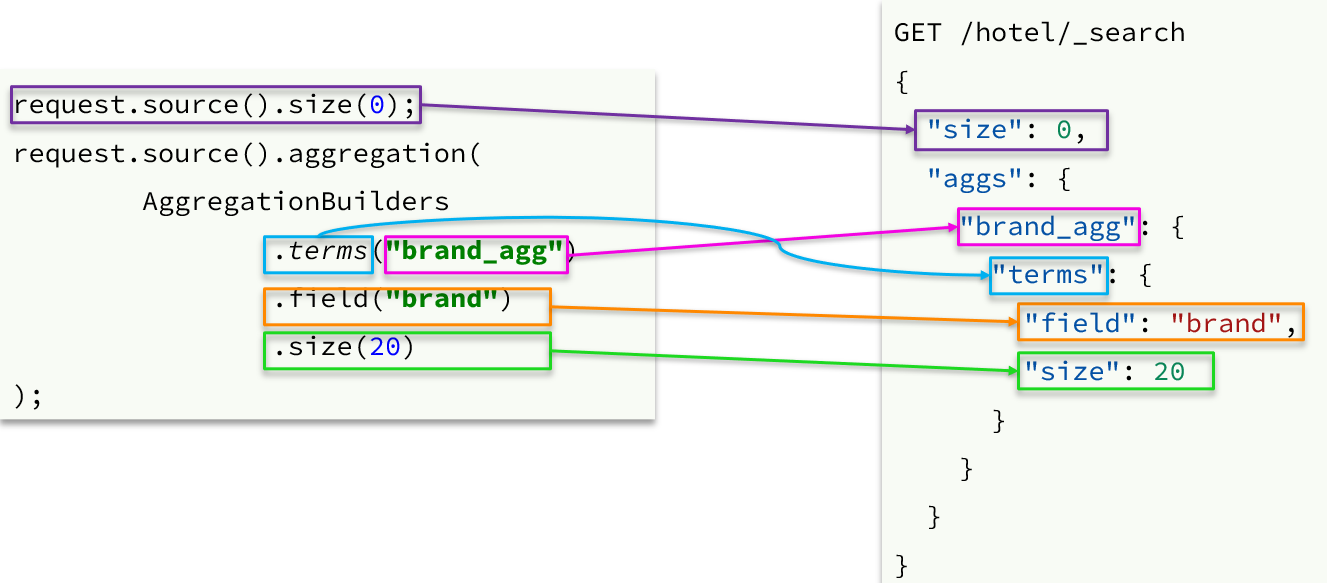
- 聚合条件与query条件同级别,因此需要使用request.source()来指定聚合条件
聚合的结果也与查询结果不同,API也比较特殊。不过同样是JSON逐层解析
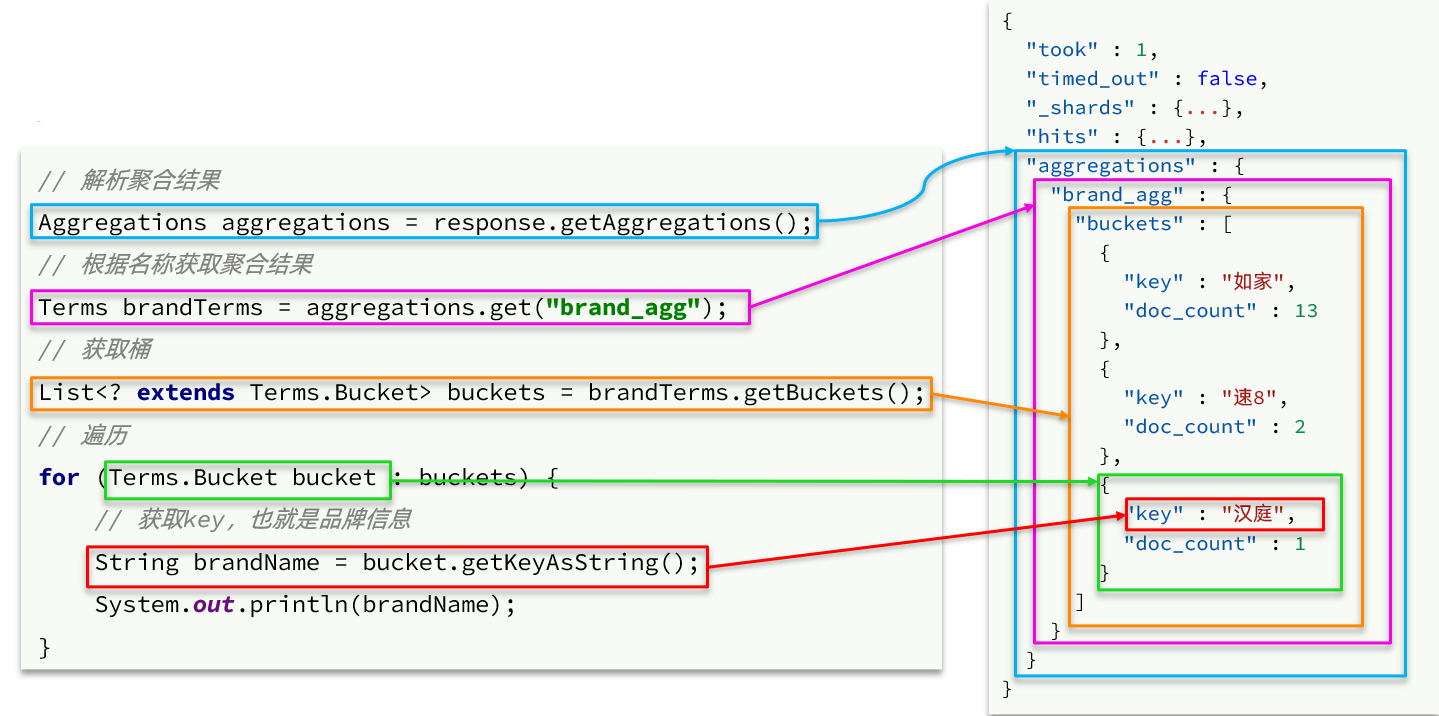
image-20221007232952649
自动补全
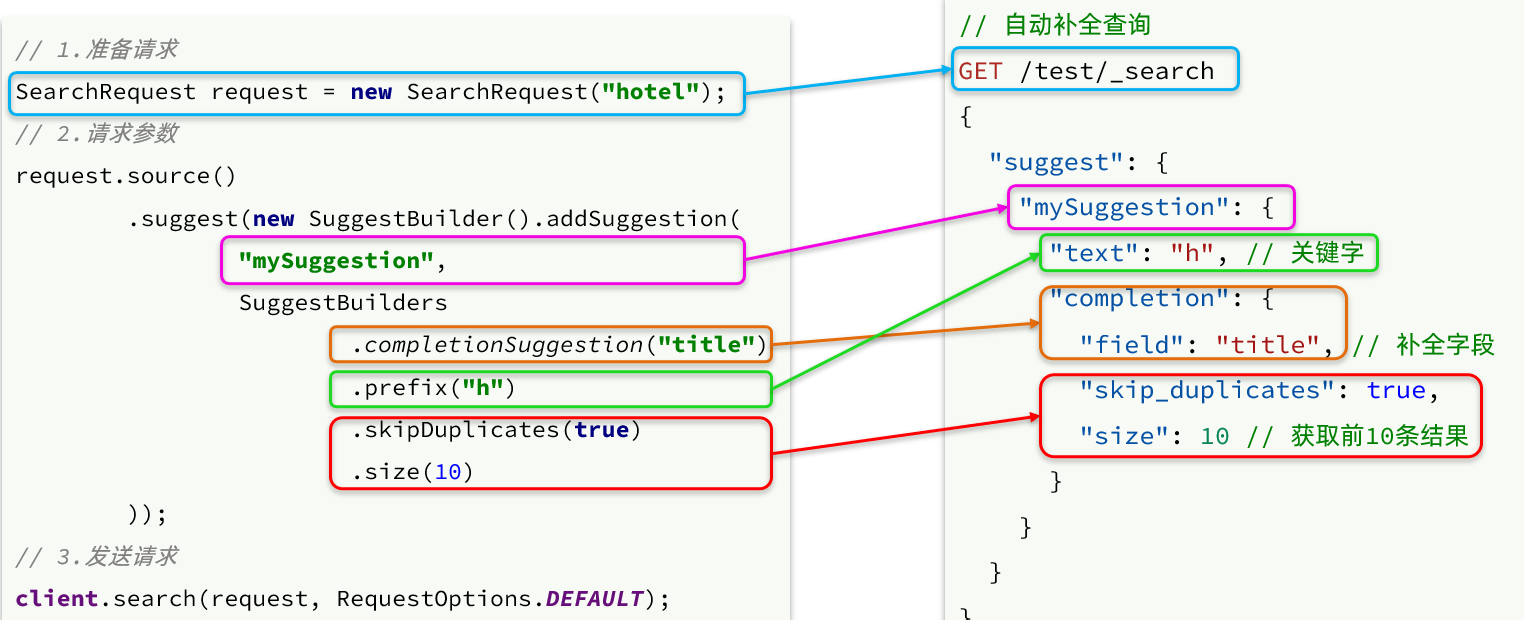
- 请求
解析
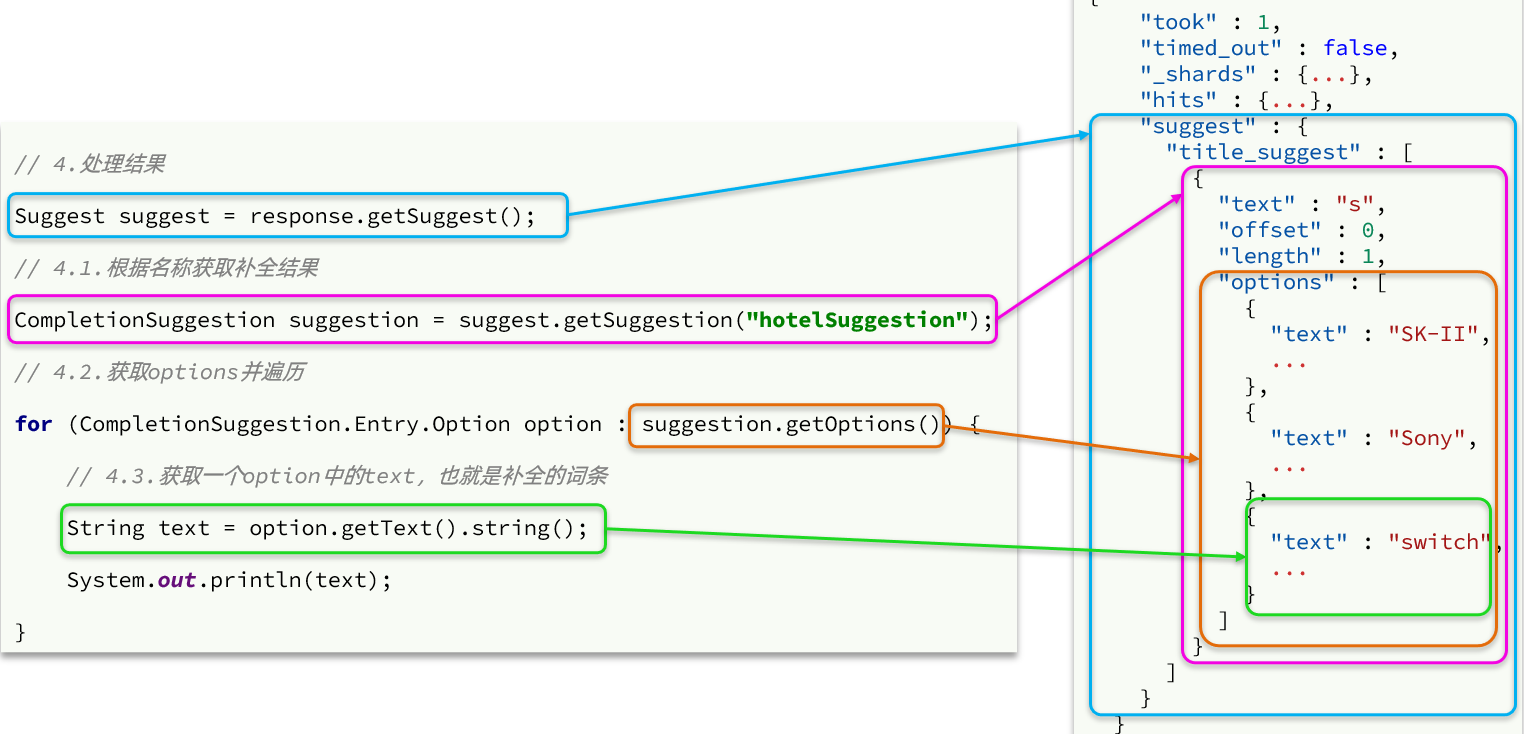
image-20221007235135822
案例
准备工作
数据库、索引库映射
PUT /hotel
{
  "mappings": {
    "properties": {
      "id": {
        "type": "keyword"
      },
      "name":{
        "type": "text",
        "analyzer": "ik_max_word",
        "copy_to": "all"
      },
      "address":{
        "type": "keyword",
        "index": false
      },
      "price":{
        "type": "integer"
      },
      "score":{
        "type": "integer"
      },
      "brand":{
        "type": "keyword",
        "copy_to": "all"
      },
      "city":{
        "type": "keyword",
        "copy_to": "all"
      },
      "starName":{
        "type": "keyword"
      },
      "business":{
        "type": "keyword"
      },
      "location":{
        "type": "geo_point"
      },
      "pic":{
        "type": "keyword",
        "index": false
      },
      "all":{
        "type": "text",
        "analyzer": "ik_max_word"
      }
    }
  }
}
依赖
<elasticsearch.version>7.12.1</elasticsearch.version>

<!--FastJson-->
<dependency>
    <groupId>com.alibaba</groupId>
    <artifactId>fastjson</artifactId>
    <version>1.2.71</version>
</dependency>
<dependency>
    <groupId>org.elasticsearch.client</groupId>
    <artifactId>elasticsearch-rest-high-level-client</artifactId>
</dependency>
配置文件
mysql
url: jdbc:mysql://localhost:3306/heima?characterEncoding=utf8&useSSL=false&serverTimezone=Asia/Shanghai&rewriteBatchedStatements=true
username: root
password: root
driver-class-name: com.mysql.jdbc.Driver
server.port:
启动类
@MapperScan("cn.itcast.hotel.mapper")
@SpringBootApplication
public class HotelDemoApplication {

    public static void main(String[] args) {
        SpringApplication.run(HotelDemoApplication.class, args);
    }

    @Bean
    public RestHighLevelClient client(){
        return  new RestHighLevelClient(RestClient.builder(
                HttpHost.create("http://192.168.10.109:9200")
        ));
    }
}
同步数据库数据
@SpringBootTest
class HotelDemoApplicationTests {
    @Autowired
    private RestHighLevelClient client;
    @Autowired
    private IHotelService hotelService;

    @Test
    void contextLoads() {
    }

    @Test
    void testBulkRequest() throws IOException {
        // 查询所有的酒店数据
        List<Hotel> list = hotelService.list();

        // 1.准备Request
        BulkRequest request = new BulkRequest();
        // 2.准备参数
        for (Hotel hotel : list) {
            // 2.1.转为HotelDoc
            HotelDoc hotelDoc = new HotelDoc(hotel);
            // 2.2.转json
            String json = JSON.toJSONString(hotelDoc);
            // 2.3.添加请求
            request.add(new IndexRequest("hotel").id(hotel.getId().toString()).source(json, XContentType.JSON));
        }

        // 3.发送请求
        client.bulk(request, RequestOptions.DEFAULT);
    }

    @AfterEach
    void tearDown() throws IOException {
        client.close();
    }
}
大搜索框
需求分析
请求方式:POST
请求路径:/hotel/list
请求参数:JSON对象,包含4个字段:
- key:搜索关键字
- page:页码
- size:每页大小
- sortBy:排序,目前暂不实现
返回值:分页查询,需要返回分页结果PageResult,包含两个属性:
total:总条数List<HotelDoc>:当前页的数据
实现业务的流程如下
- 步骤一:定义实体类,接收请求参数的JSON对象
- 步骤二:编写controller,接收页面的请求
- 步骤三:编写业务实现,利用RestHighLevelClient实现搜索、分页
pojo
前端请求参数
{
    "key": "搜索关键字",
    "page": 1,
    "size": 3,
    "sortBy": "default"
}
请求参数类
@Data
public class RequestParams {
    private String key;
    private Integer page;
    private Integer size;
    private String sortBy;
}
返回值
@Data
public class PageResult {
    private Long total;
    private List<HotelDoc> hotels;

    public PageResult() {
    }

    public PageResult(Long total, List<HotelDoc> hotels) {
        this.total = total;
        this.hotels = hotels;
    }
}
controller
@RestController
@RequestMapping("/hotel")
public class HotelController {

    @Autowired
    private IHotelService hotelService;
	// 搜索酒店数据
    @PostMapping("/list")
    public PageResult search(@RequestBody RequestParams params){
        return hotelService.search(params);
    }
}
service
public interface IHotelService{
  /**
   * 根据关键字搜索酒店信息
   * @param params 请求参数对象,包含用户输入的关键字
   * @return 酒店文档列表
   */
  PageResult search(RequestParams params);
}
public class IHotelServiceImpl implements IHotelService{
  @Override
  public PageResult search(RequestParams params) {
      try {
          // 1.准备Request
          SearchRequest request = new SearchRequest("hotel");
          // 2.准备DSL
          // 2.1.query
          String key = params.getKey();
          BoolQueryBuilder boolQuery = QueryBuilders.boolQuery();
          if (key == null || "".equals(key)) {
              boolQuery.must(QueryBuilders.matchAllQuery());
          } else {
              boolQuery.must(QueryBuilders.matchQuery("all", key));
          }
          request.source().query(boolQuery);

          // 2.2.分页
          int page = params.getPage();
          int size = params.getSize();
          request.source().from((page - 1) * size).size(size);

          // 3.发送请求
          SearchResponse response = client.search(request, RequestOptions.DEFAULT);
          // 4.解析响应
          return handleResponse(response);
      } catch (IOException e) {
          throw new RuntimeException(e);
      }
  }

  // 结果解析
  private PageResult handleResponse(SearchResponse response) {
      // 4.解析响应
      SearchHits searchHits = response.getHits();
      // 4.1.获取总条数
      long total = searchHits.getTotalHits().value;
      // 4.2.文档数组
      SearchHit[] hits = searchHits.getHits();
      // 4.3.遍历
      List<HotelDoc> hotels = new ArrayList<>();
      for (SearchHit hit : hits) {
          // 获取文档source
          String json = hit.getSourceAsString();
          // 反序列化
          HotelDoc hotelDoc = JSON.parseObject(json, HotelDoc.class);
      // 放入集合
          hotels.add(hotelDoc);
      }
      // 4.4.封装返回
      return new PageResult(total, hotels);
  }
}
标签过滤
需求分析
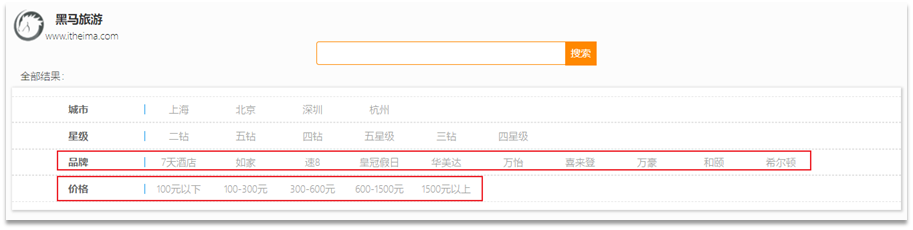
包含的过滤条件有:
- brand:品牌值
- city:城市
- minPrice~maxPrice:价格范围
- starName:星级
我们需要做两件事情:
- 修改请求参数的对象RequestParams,接收上述参数
- 修改业务逻辑,在搜索条件之外,添加一些过滤条件
修改pojo
@Data
public class RequestParams {
    private String key;
    private Integer page;
    private Integer size;
    private String sortBy;
    // 下面是新增的过滤条件参数
    private String city;
    private String brand;
    private String starName;
    private Integer minPrice;
    private Integer maxPrice;
}
修改service
search方法中,只有一个地方需要修改:requet.source().query( ... )其中的查询条件。
在之前的业务中,只有match查询,根据关键字搜索,现在要添加条件过滤,包括:
- 品牌过滤:是keyword类型,用term查询
- 星级过滤:是keyword类型,用term查询
- 价格过滤:是数值类型,用range查询
- 城市过滤:是keyword类型,用term查询
多个查询条件组合,肯定是boolean查询来组合:
- 关键字搜索放到must中,参与算分
- 其它过滤条件放到filter中,不参与算分
@Override
  public PageResult search(RequestParams params) {
      try {
          // 1.准备Request
          SearchRequest request = new SearchRequest("hotel");
          //查询
		  buildBoolQuery(params,request);
          //分页
          int page = params.getPage();
          int size = params.getSize();
          request.source().from((page - 1) * size).size(size);
          //发送请求
          SearchResponse response = client.search(request, RequestOptions.DEFAULT);
          //解析响应
          return handleResponse(response);
      } catch (IOException e) {
          throw new RuntimeException(e);
      }
  }

private void buildBoolQuery(RequestParams params, SearchRequest request) {
    // 构建BoolQueryBuilder
    BoolQueryBuilder boolQuery = QueryBuilders.boolQuery();
    // 关键字查询
    String key = params.getKey();
    if (key == null || "".equals(key)) {
        boolQuery.must(QueryBuilders.matchAllQuery());
    } else {
        boolQuery.must(QueryBuilders.matchQuery("all", key));
    }
    //城市查询
    String city = params.getCity();
    if (city != null && !"".equals(city)){
        boolQuery.must(QueryBuilders.termQuery("city", city));
    }
    //品牌查询
    String brand = params.getBrand();
    if (brand != null && !"".equals(brand)){
        boolQuery.must(QueryBuilders.termQuery("brand", brand));
    }
    //星级查询
    String starName = params.getStarName();
    if (starName != null && !"".equals(starName)){
        boolQuery.filter(QueryBuilders.termQuery("starName",starName));
    }
    //价格查询
    Integer minPrice = params.getMinPrice();
    Integer maxPrice = params.getMaxPrice();
    if (minPrice != null && maxPrice != null){
        boolQuery.filter(QueryBuilders.rangeQuery("price")
                .gte(minPrice)
                .lte(maxPrice));
    }
    request.source().query(boolQuery);

}
附近的酒店
需求分析
{
    "key": "搜索关键字",
  	"location": "31.03463,121.61245",
    "page": 1,
    "size": 3,
    "sortBy": "default"
}
我们要做的事情就是基于这个location坐标,然后按照距离对周围酒店排序。实现思路如下:
- 修改RequestParams参数,接收location字段
- 修改search方法业务逻辑,如果location有值,添加根据geo_distance排序的功能
修改pojo
@Data
public class RequestParams {
    private String key;
    private Integer page;
    private Integer size;
    private String sortBy;
    private String city;
    private String brand;
    private String starName;
    private Integer minPrice;
    private Integer maxPrice;
    // 我当前的地理坐标
    private String location;
}
修改service
@Override
public PageResult search(RequestParams params) {
    try {
        // 1.准备Request
        SearchRequest request = new SearchRequest("hotel");
        // 2.准备DSL
        // 2.1.query
        buildBasicQuery(params, request);

        // 2.2.分页
        int page = params.getPage();
        int size = params.getSize();
        request.source().from((page - 1) * size).size(size);

        // 2.3.排序
        String location = params.getLocation();
        if (location != null && !location.equals("")) {
            request.source().sort(SortBuilders
                                  .geoDistanceSort("location", new GeoPoint(location))
                                  .order(SortOrder.ASC)
                                  .unit(DistanceUnit.KILOMETERS)
                                 );
        }

        // 3.发送请求
        SearchResponse response = client.search(request, RequestOptions.DEFAULT);
        // 4.解析响应
        return handleResponse(response);
    } catch (IOException e) {
        throw new RuntimeException(e);
    }
}
返回排序距离
修改HotelDoc类,添加距离字段
@Data
@NoArgsConstructor
public class HotelDoc {
    private Long id;
    private String name;
    private String address;
    private Integer price;
    private Integer score;
    private String brand;
    private String city;
    private String starName;
    private String business;
    private String location;
    private String pic;
    // 排序时的 距离值
    private Object distance;

    public HotelDoc(Hotel hotel) {
        this.id = hotel.getId();
        this.name = hotel.getName();
        this.address = hotel.getAddress();
        this.price = hotel.getPrice();
        this.score = hotel.getScore();
        this.brand = hotel.getBrand();
        this.city = hotel.getCity();
        this.starName = hotel.getStarName();
        this.business = hotel.getBusiness();
        this.location = hotel.getLatitude() + ", " + hotel.getLongitude();
        this.pic = hotel.getPic();
    }
}
修改service
private PageResult handleResponse(SearchResponse response) {
    // 4.解析响应
    SearchHits searchHits = response.getHits();
    // 4.1.获取总条数
    long total = searchHits.getTotalHits().value;
    // 4.2.文档数组
    SearchHit[] hits = searchHits.getHits();
    // 4.3.遍历
    List<HotelDoc> hotels = new ArrayList<>();
    for (SearchHit hit : hits) {
        // 获取文档source
        String json = hit.getSourceAsString();
        // 反序列化
        HotelDoc hotelDoc = JSON.parseObject(json, HotelDoc.class);
      	// 获取排序值
      	Object[] sortValues = hit.getSortValues();
      	if(sortvalues.length > 0){
          Object sortValue = sortValue[0];
          hotelDoc.setDistance(sortValue);
        }
    		// 放入集合
        hotels.add(hotelDoc);
    }
    // 4.4.封装返回
    return new PageResult(total, hotels);
}
竞价排名
需求分析
让指定酒店排名靠前。因此我们需要给这些酒店添加一个标记,这样在过滤条件中就可以根据这个标记来判断,是否要提高算分。
比如,我们给酒店添加一个字段:isAD,Boolean类型:
- true:是广告
- false:不是广告
这样function_score包含3个要素就很好确定了:
- 过滤条件:判断isAD 是否为true
- 算分函数:我们可以用最简单暴力的weight,固定加权值
- 加权方式:可以用默认的相乘,大大提高算分
业务的实现步骤包括:
给HotelDoc类添加isAD字段,Boolean类型
挑选几个你喜欢的酒店,给它的文档数据添加isAD字段,值为true
修改search方法,添加function score功能,给isAD值为true的酒店增加权重
修改HotelDoc
@Data
@NoArgsConstructor
public class HotelDoc {
    private Long id;
    private String name;
    private String address;
    private Integer price;
    private Integer score;
    private String brand;
    private String city;
    private String starName;
    private String business;
    private String location;
    private String pic;
    // 排序时的 距离值
    private Object distance;
    //广告标记
    private Boolean isAD;


    public HotelDoc(Hotel hotel) {
        this.id = hotel.getId();
        this.name = hotel.getName();
        this.address = hotel.getAddress();
        this.price = hotel.getPrice();
        this.score = hotel.getScore();
        this.brand = hotel.getBrand();
        this.city = hotel.getCity();
        this.starName = hotel.getStarName();
        this.business = hotel.getBusiness();
        this.location = hotel.getLatitude() + ", " + hotel.getLongitude();
        this.pic = hotel.getPic();
    }
}
索引库添加广告标记
POST /hotel/_update/1902197537
{
    "doc": {
        "isAD": true
    }
}
POST /hotel/_update/2056126831
{
    "doc": {
        "isAD": true
    }
}
POST /hotel/_update/1989806195
{
    "doc": {
        "isAD": true
    }
}
POST /hotel/_update/2056105938
{
    "doc": {
        "isAD": true
    }
}
添加算分函数查询
接下来我们就要修改查询条件了。之前是用的boolean 查询,现在要改成function_socre查询
private void buildBasicQuery(RequestParams params, SearchRequest request) {
    // 1.构建BooleanQuery
    BoolQueryBuilder boolQuery = QueryBuilders.boolQuery();
    // 关键字搜索
    String key = params.getKey();
    if (key == null || "".equals(key)) {
        boolQuery.must(QueryBuilders.matchAllQuery());
    } else {
        boolQuery.must(QueryBuilders.matchQuery("all", key));
    }
    // 城市条件
    if (params.getCity() != null && !params.getCity().equals("")) {
        boolQuery.filter(QueryBuilders.termQuery("city", params.getCity()));
    }
    // 品牌条件
    if (params.getBrand() != null && !params.getBrand().equals("")) {
        boolQuery.filter(QueryBuilders.termQuery("brand", params.getBrand()));
    }
    // 星级条件
    if (params.getStarName() != null && !params.getStarName().equals("")) {
        boolQuery.filter(QueryBuilders.termQuery("starName", params.getStarName()));
    }
    // 价格
    if (params.getMinPrice() != null && params.getMaxPrice() != null) {
        boolQuery.filter(QueryBuilders
                         .rangeQuery("price")
                         .gte(params.getMinPrice())
                         .lte(params.getMaxPrice())
                        );
    }

    // 2.算分控制
    FunctionScoreQueryBuilder functionScoreQuery =
        QueryBuilders.functionScoreQuery(
        // 原始查询,相关性算分的查询
        boolQuery,
        // function score的数组
        new FunctionScoreQueryBuilder.FilterFunctionBuilder[]{
            // 其中的一个function score 元素
            new FunctionScoreQueryBuilder.FilterFunctionBuilder(
                // 过滤条件
                QueryBuilders.termQuery("isAD", true),
                // 算分函数
                ScoreFunctionBuilders.weightFactorFunction(10)
            )
        });
    request.source().query(functionScoreQuery);
}
动态标签
业务需求
需求:搜索页面的品牌、城市等信息不应该是在页面写死,而是通过聚合索引库中的酒店数据得来的
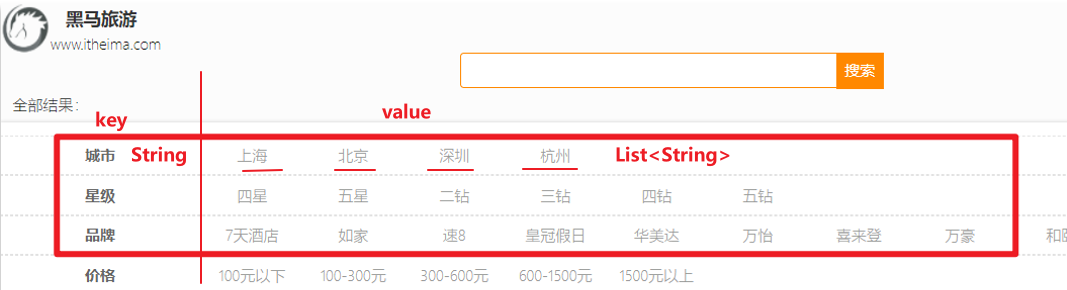
image-20221007233331658 分析
- 使用聚合功能,利用Bucket聚合,对搜索结果中的文档基于品牌分组、基于城市分组,就能得知包含哪些品牌、哪些城市了
- 因为是对搜索结果聚合,因此聚合是限定范围的聚合,也就是说聚合的限定条件跟搜索文档的条件一致
- 请求参数与搜索文档的参数完全一致
- 返回值Map结构
- key是字符串,城市、星级、品牌、价格
- value是集合,例如多个城市的名称
controller
@PostMapping("filters")
public Map<String, List<String>> getFilters(@RequestBody RequestParams params){
    return hotelService.getFilters(params);
}
service
Map<String, List<String>> filters(RequestParams params);
@Override
public Map<String, List<String>> filters(RequestParams params) {
    try {
        // 1.准备Request
        SearchRequest request = new SearchRequest("hotel");
        // 2.准备DSL
        // 2.1.query
        buildBasicQuery(params, request);
        // 2.2.设置size
        request.source().size(0);
        // 2.3.聚合
        buildAggregation(request);
        // 3.发出请求
        SearchResponse response = client.search(request, RequestOptions.DEFAULT);
        // 4.解析结果
        Map<String, List<String>> result = new HashMap<>();
        Aggregations aggregations = response.getAggregations();
        // 4.1.根据品牌名称,获取品牌结果
        List<String> brandList = getAggByName(aggregations, "brandAgg");
        result.put("品牌", brandList);
        // 4.2.根据品牌名称,获取品牌结果
        List<String> cityList = getAggByName(aggregations, "cityAgg");
        result.put("城市", cityList);
        // 4.3.根据品牌名称,获取品牌结果
        List<String> starList = getAggByName(aggregations, "starAgg");
        result.put("星级", starList);

        return result;
    } catch (IOException e) {
        throw new RuntimeException(e);
    }
}

private void buildAggregation(SearchRequest request) {
    request.source().aggregation(AggregationBuilders
                                 .terms("brandAgg")
                                 .field("brand")
                                 .size(100)
                                );
    request.source().aggregation(AggregationBuilders
                                 .terms("cityAgg")
                                 .field("city")
                                 .size(100)
                                );
    request.source().aggregation(AggregationBuilders
                                 .terms("starAgg")
                                 .field("starName")
                                 .size(100)
                                );
}

private List<String> getAggByName(Aggregations aggregations, String aggName) {
    // 4.1.根据聚合名称获取聚合结果
    Terms brandTerms = aggregations.get(aggName);
    // 4.2.获取buckets
    List<? extends Terms.Bucket> buckets = brandTerms.getBuckets();
    // 4.3.遍历
    List<String> brandList = new ArrayList<>();
    for (Terms.Bucket bucket : buckets) {
        // 4.4.获取key
        String key = bucket.getKeyAsString();
        brandList.add(key);
    }
    return brandList;
}
自动补全
业务需求
- 当用户在搜索框输入字符时,我们应该提示出与该字符有关的搜索项
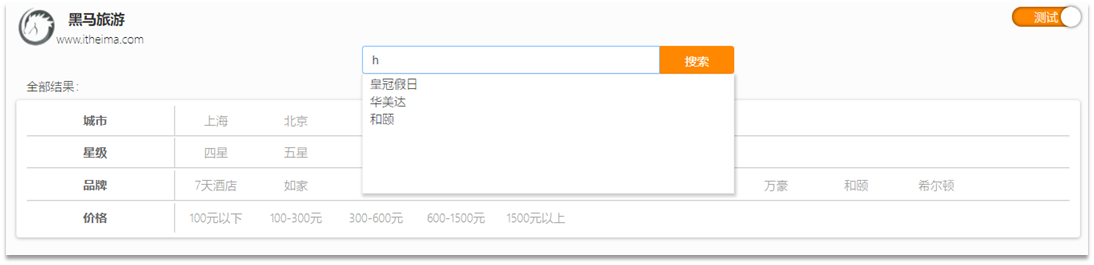
因为需要根据拼音字母来推断,因此要用到拼音分词功能
需要修改索引库中的配置。但是我们知道索引库是无法修改的,只能删除然后重新创建。
需要添加一个字段,用来做自动补全,将brand、suggestion、city等都放进去,作为自动补全的提示
步骤
修改hotel索引库结构,设置自定义拼音分词器
修改索引库的name、all字段,使用自定义分词器
索引库添加一个新字段suggestion,类型为completion类型,使用自定义的分词器
给HotelDoc类添加suggestion字段,内容包含brand、business
重新导入数据到hotel库
重新创建索引库
// 酒店数据索引库
PUT /hotel
{
  "settings": {
    "analysis": {
      "analyzer": {
        "text_anlyzer": {
          "tokenizer": "ik_max_word",
          "filter": "py"
        },
        "completion_analyzer": {
          "tokenizer": "keyword",
          "filter": "py"
        }
      },
      "filter": {
        "py": {
          "type": "pinyin",
          "keep_full_pinyin": false,
          "keep_joined_full_pinyin": true,
          "keep_original": true,
          "limit_first_letter_length": 16,
          "remove_duplicated_term": true,
          "none_chinese_pinyin_tokenize": false
        }
      }
    }
  },
  "mappings": {
    "properties": {
      "id":{
        "type": "keyword"
      },
      "name":{
        "type": "text",
        "analyzer": "text_anlyzer",
        "search_analyzer": "ik_smart",
        "copy_to": "all"
      },
      "address":{
        "type": "keyword",
        "index": false
      },
      "price":{
        "type": "integer"
      },
      "score":{
        "type": "integer"
      },
      "brand":{
        "type": "keyword",
        "copy_to": "all"
      },
      "city":{
        "type": "keyword"
      },
      "starName":{
        "type": "keyword"
      },
      "business":{
        "type": "keyword",
        "copy_to": "all"
      },
      "location":{
        "type": "geo_point"
      },
      "pic":{
        "type": "keyword",
        "index": false
      },
      "all":{
        "type": "text",
        "analyzer": "text_anlyzer",
        "search_analyzer": "ik_smart"
      },
      "suggestion":{
          "type": "completion",
          "analyzer": "completion_analyzer"
      }
    }
  }
}
导入数据:略
修改HotelDoc
HotelDoc中要添加一个字段,用来做自动补全,内容可以是酒店品牌、城市、商圈等信息。按照自动补全字段的要求,最好是这些字段的数组。
因此我们在HotelDoc中添加一个suggestion字段,类型为List<String>,然后将brand、city、business等信息放到里面。
@Data
@NoArgsConstructor
public class HotelDoc {
    private Long id;
    private String name;
    private String address;
    private Integer price;
    private Integer score;
    private String brand;
    private String city;
    private String starName;
    private String business;
    private String location;
    private String pic;
    private Object distance;
    private Boolean isAD;
    private List<String> suggestion;

    public HotelDoc(Hotel hotel) {
        this.id = hotel.getId();
        this.name = hotel.getName();
        this.address = hotel.getAddress();
        this.price = hotel.getPrice();
        this.score = hotel.getScore();
        this.brand = hotel.getBrand();
        this.city = hotel.getCity();
        this.starName = hotel.getStarName();
        this.business = hotel.getBusiness();
        this.location = hotel.getLatitude() + ", " + hotel.getLongitude();
        this.pic = hotel.getPic();
        // 组装suggestion
        if(this.business.contains("/")){
            // business有多个值,需要切割
            String[] arr = this.business.split("/");
            // 添加元素
            this.suggestion = new ArrayList<>();
            this.suggestion.add(this.brand);
            Collections.addAll(this.suggestion, arr);
        }else {
            this.suggestion = Arrays.asList(this.brand, this.business);
        }
    }
}
controller
返回值是补全词条的集合,类型为List<String>
@GetMapping("suggestion")
public List<String> getSuggestions(@RequestParam("key") String prefix) {
    return hotelService.getSuggestions(prefix);
}
service
List<String> getSuggestions(String prefix);
@Override
public List<String> getSuggestions(String prefix) {
    try {
        // 1.准备Request
        SearchRequest request = new SearchRequest("hotel");
        // 2.准备DSL
        request.source().suggest(new SuggestBuilder().addSuggestion(
            "suggestions",
            SuggestBuilders.completionSuggestion("suggestion")
            .prefix(prefix)
            .skipDuplicates(true)
            .size(10)
        ));
        // 3.发起请求
        SearchResponse response = client.search(request, RequestOptions.DEFAULT);
        // 4.解析结果
        Suggest suggest = response.getSuggest();
        // 4.1.根据补全查询名称,获取补全结果
        CompletionSuggestion suggestions = suggest.getSuggestion("suggestions");
        // 4.2.获取options
        List<CompletionSuggestion.Entry.Option> options = suggestions.getOptions();
        // 4.3.遍历
        List<String> list = new ArrayList<>(options.size());
        for (CompletionSuggestion.Entry.Option option : options) {
            String text = option.getText().toString();
            list.add(text);
        }
        return list;
    } catch (IOException e) {
        throw new RuntimeException(e);
    }
}
数据同步
数据同步:数据来自于mysql数据库,因此mysql数据发生改变时,elasticsearch也必须跟着改变
解决方案
同步调用
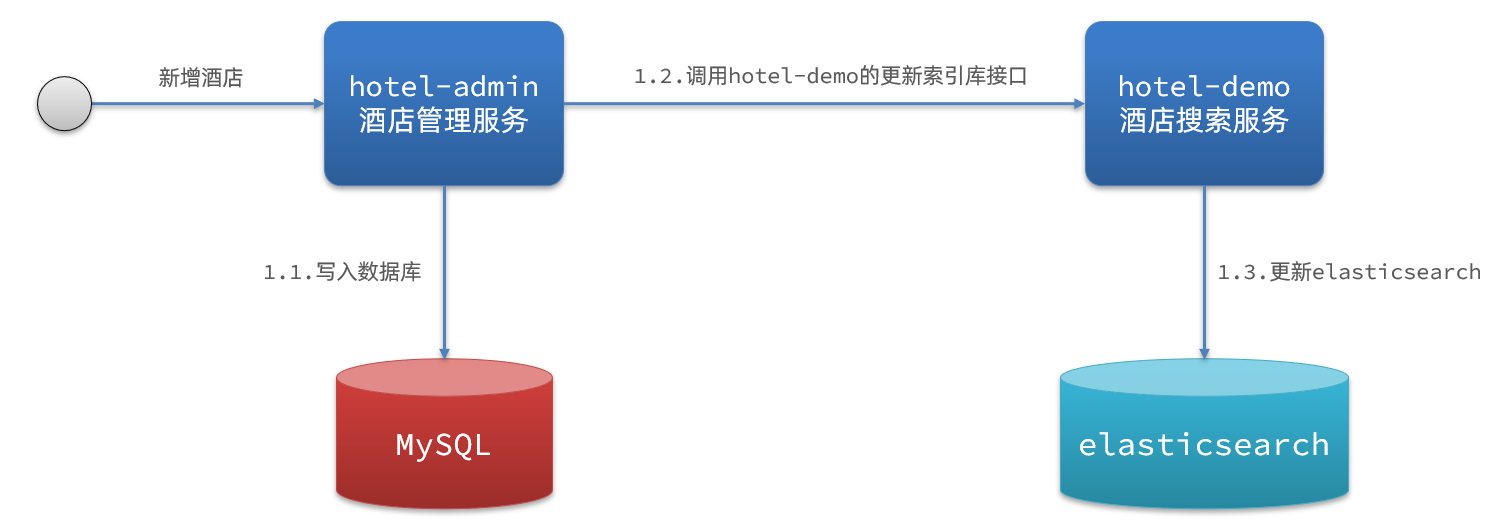
基本步骤如下:
- hotel-demo对外提供接口,用来修改elasticsearch中的数据
- 酒店管理服务在完成数据库操作后,直接调用hotel-demo提供的接口
异步通知

流程如下:
- hotel-admin对mysql数据库数据完成增、删、改后,发送MQ消息
- hotel-demo监听MQ,接收到消息后完成elasticsearch数据修改
监听binlog
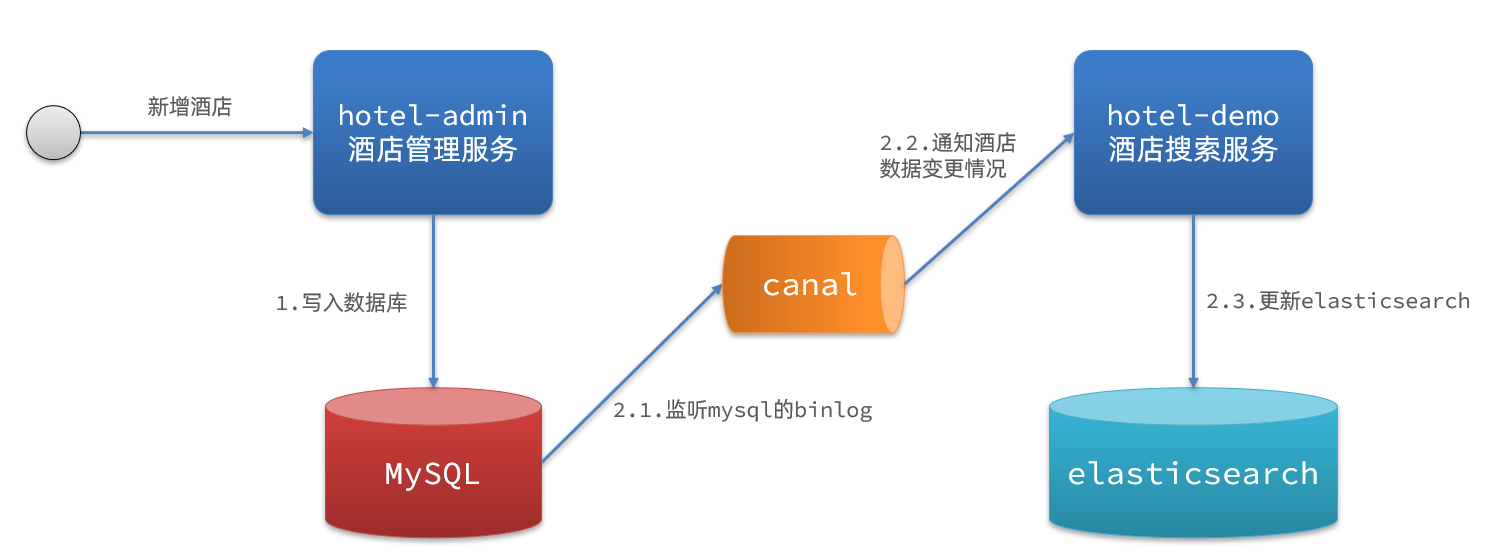
流程如下:
- 给mysql开启binlog功能
- mysql完成增、删、改操作都会记录在binlog中
- hotel-demo基于canal监听binlog变化,实时更新elasticsearch中的内容
选择
方式一:同步调用
- 优点:实现简单,粗暴
- 缺点:业务耦合度高
方式二:异步通知
- 优点:低耦合,实现难度一般
- 缺点:依赖mq的可靠性
方式三:监听binlog
- 优点:完全解除服务间耦合
- 缺点:开启binlog增加数据库负担、实现复杂度高
MQ实现数据同步
Rocketmq实现数据同步
操作数据库的服务为消息提供者,当数据发生增删改时,发送消息
操作索引库的服务为消息消费者,当数据发生增删改时,接收消息
引入依赖
<dependency>
    <groupId>org.apache.rocketmq</groupId>
    <artifactId>rocketmq-spring-boot-starter</artifactId>
    <version>2.0.3</version>
</dependency>
配置文件
rocketmq:
  name-server: 192.168.10.103:9876;192.168.10.102:9876
发送消息
@RestController
@RequestMapping("hotel")
public class HotelController {

    @Autowired
    private IHotelService hotelService;
    @Autowired
    private RocketMQTemplate rocketMQTemplate;

    //@GetMapping("/{id}")
    //......

    @PostMapping
    public void saveHotel(@RequestBody Hotel hotel){
        hotelService.save(hotel);
        rocketMQTemplate.convertAndSend("insert-hotel",hotel.getId());
    }

    @PutMapping()
    public void updateById(@RequestBody Hotel hotel){
        if (hotel.getId() == null) {
            throw new InvalidParameterException("id不能为空");
        }
        hotelService.updateById(hotel);
        rocketMQTemplate.convertAndSend("insert-hotel",hotel.getId());
    }

    @DeleteMapping("/{id}")
    public void deleteById(@PathVariable("id") Long id) {
        hotelService.removeById(id);
        rocketMQTemplate.convertAndSend("delete-hotel",id);
    }
}
接收消息
- 监听器
package cn.itcast.hotel.mq;
@RocketMQMessageListener(topic = "delete-hotel", consumerGroup = "hotel-consumer1")
@Service
public class HotelDelete implements RocketMQListener<Long> {
    @Autowired
    private IHotelService hotelService;

    @Override
    public void onMessage(Long id) {
        System.out.println("开始同步");
        hotelService.deleteById(id);
        System.out.println("同步完成");
    }
}
package cn.itcast.hotel.mq; @RocketMQMessageListener(topic = "insert-hotel", consumerGroup = "hotel-consumer2") @Service public class HotelInsertOrUpdate implements RocketMQListener<Long> { @Autowired private IHotelService hotelService; @Override public void onMessage(Long id) { System.out.println("开始同步"); hotelService.insertById(id); System.out.println("同步完成"); } }service
public interface IHotelService extends IService<Hotel> {
    PageResult search(RequestParams params);

    Map<String, List<String>> getFilters(RequestParams params);

    List<String> getSuggestions(String prefix);

    void deleteById(Long id);

    void insertById(Long id);
}
@Override public void deleteById(Long id) { DeleteRequest deleteRequest = new DeleteRequest("hotel", id.toString()); try { client.delete(deleteRequest,RequestOptions.DEFAULT); } catch (IOException e) { throw new RuntimeException(e); } } @Override public void insertById(Long id) { Hotel hotel = getById(id); HotelDoc hotelDoc = new HotelDoc(hotel); IndexRequest indexRequest = new IndexRequest("hotel").id(hotel.getId().toString()); indexRequest.source(JSON.toJSONString(hotelDoc), XContentType.JSON); try { client.index(indexRequest,RequestOptions.DEFAULT); } catch (IOException e) { throw new RuntimeException(e); } }
Rabbitmq实现数据同步
依赖
<!--amqp-->
<dependency>
    <groupId>org.springframework.boot</groupId>
    <artifactId>spring-boot-starter-amqp</artifactId>
</dependency>
常量类
package cn.itcast.hotel.constatnts;

    public class MqConstants {
    /**
     * 交换机
     */
    public final static String HOTEL_EXCHANGE = "hotel.topic";
    /**
     * 监听新增和修改的队列
     */
    public final static String HOTEL_INSERT_QUEUE = "hotel.insert.queue";
    /**
     * 监听删除的队列
     */
    public final static String HOTEL_DELETE_QUEUE = "hotel.delete.queue";
    /**
     * 新增或修改的RoutingKey
     */
    public final static String HOTEL_INSERT_KEY = "hotel.insert";
    /**
     * 删除的RoutingKey
     */
    public final static String HOTEL_DELETE_KEY = "hotel.delete";
}
配置类,声明队列、交换机
@Configuration
public class MqConfig {
    @Bean
    public TopicExchange topicExchange(){
        return new TopicExchange(MqConstants.HOTEL_EXCHANGE, true, false);
    }

    @Bean
    public Queue insertQueue(){
        return new Queue(MqConstants.HOTEL_INSERT_QUEUE, true);
    }

    @Bean
    public Queue deleteQueue(){
        return new Queue(MqConstants.HOTEL_DELETE_QUEUE, true);
    }

    @Bean
    public Binding insertQueueBinding(){
        return BindingBuilder.bind(insertQueue()).to(topicExchange()).with(MqConstants.HOTEL_INSERT_KEY);
    }

    @Bean
    public Binding deleteQueueBinding(){
        return BindingBuilder.bind(deleteQueue()).to(topicExchange()).with(MqConstants.HOTEL_DELETE_KEY);
    }
}
发送
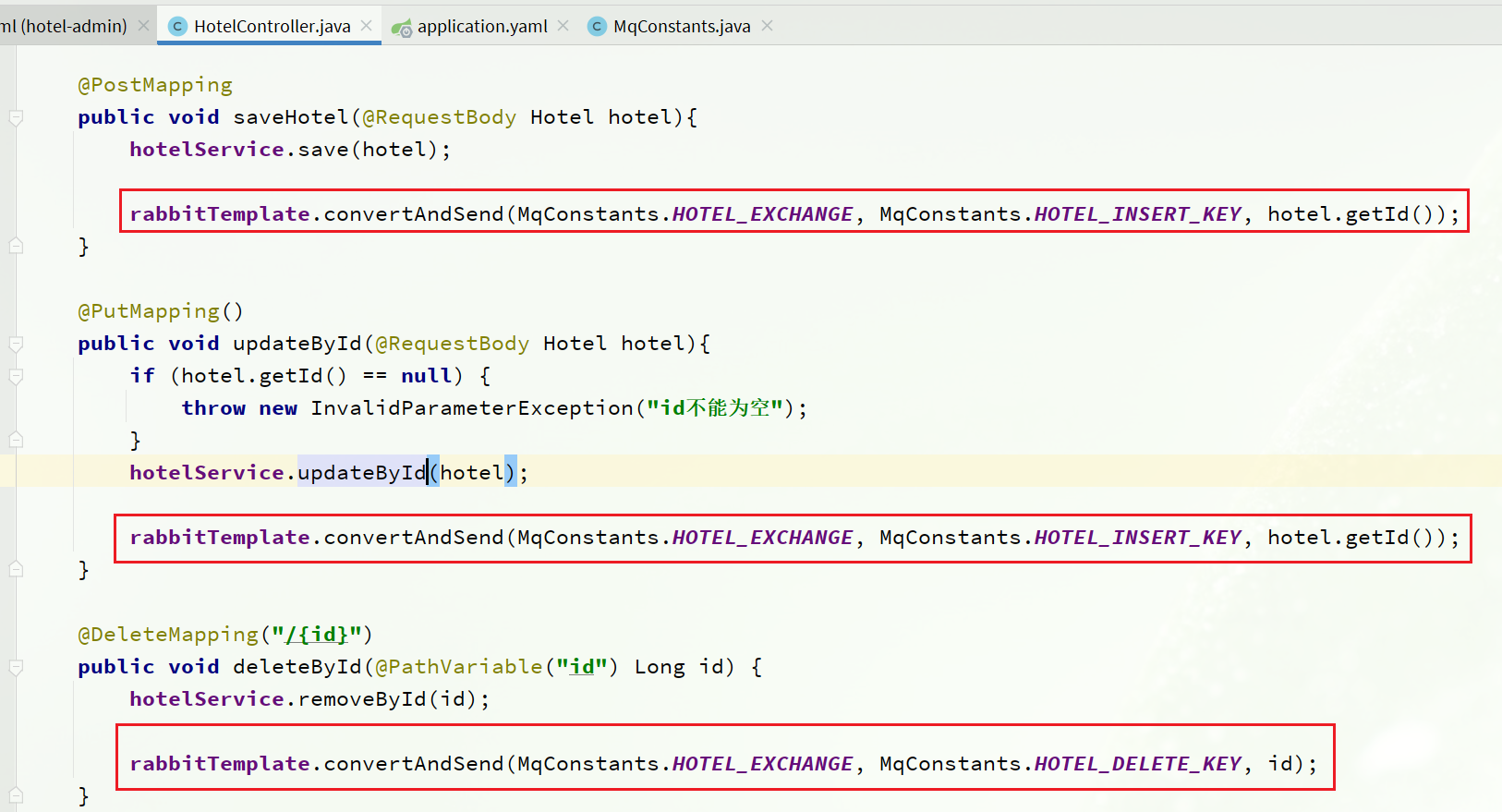
image-20221010001217621 接收
@Component
public class HotelListener {

    @Autowired
    private IHotelService hotelService;

    /**
     * 监听酒店新增或修改的业务
     * @param id 酒店id
     */
    @RabbitListener(queues = MqConstants.HOTEL_INSERT_QUEUE)
    public void listenHotelInsertOrUpdate(Long id){
        hotelService.insertById(id);
    }

    /**
     * 监听酒店删除的业务
     * @param id 酒店id
     */
    @RabbitListener(queues = MqConstants.HOTEL_DELETE_QUEUE)
    public void listenHotelDelete(Long id){
        hotelService.deleteById(id);
    }
}
service同
集群
单机的elasticsearch做数据存储,必然面临两个问题:海量数据存储问题、单点故障问题。
- 海量数据存储问题:将索引库从逻辑上拆分为N个分片(shard),存储到多个节点
- 单点故障问题:将分片数据在不同节点备份(replica )
ES集群相关概念:
集群(cluster):一组拥有共同的 cluster name 的 节点。
- :集群中的一个 Elasticearch 实例
- :索引可以被拆分为不同的部分进行存储,称为分片。在集群环境下,一个索引的不同分片可以拆分到不同的节点中
解决问题:数据量太大,单点存储量有限的问题
主分片(Primary shard):相对于副本分片的定义
副本分片(Replica shard)每个主分片可以有一个或者多个副本,数据和主分片一样
数据备份可以保证高可用,但是每个分片备份一份,所需要的节点数量就会翻一倍,成本实在是太高了!
为了在高可用和成本间寻求平衡,我们可以这样做:
- 首先对数据分片,存储到不同节点
- 然后对每个分片进行备份,放到对方节点,完成互相备份
这样可以大大减少所需要的服务节点数量,如图,我们以3分片,每个分片备份一份为例:
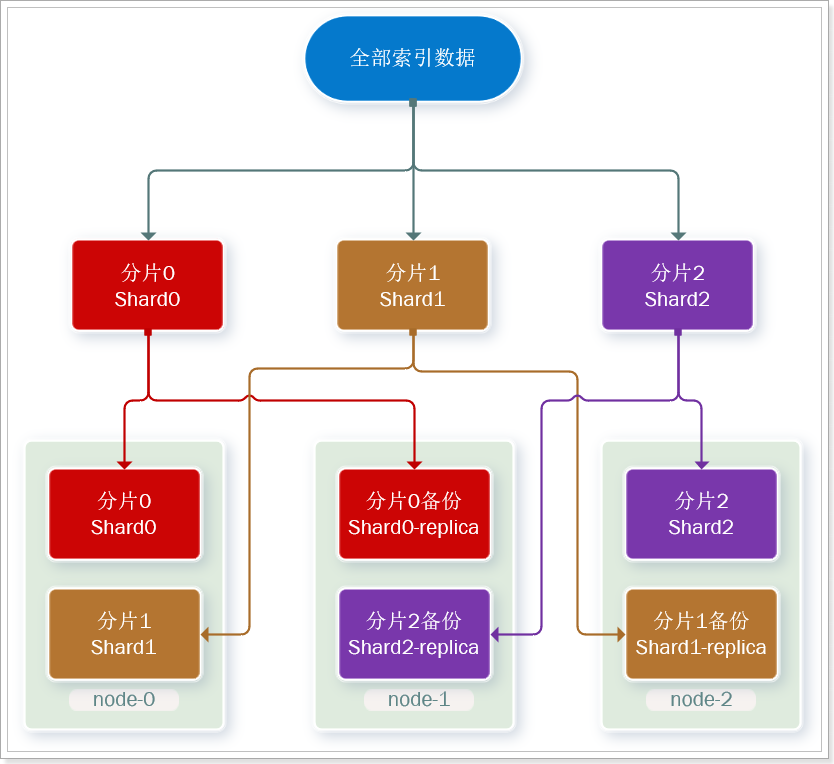
现在,每个分片都有1个备份,存储在3个节点:
- node0:保存了分片0和1
- node1:保存了分片0和2
- node2:保存了分片1和2
创建索引库
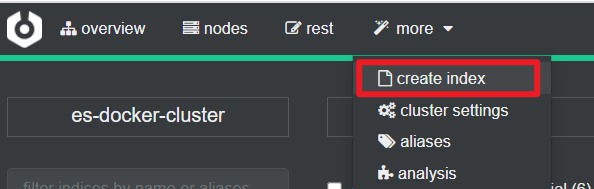
kibana创建索引库
在DevTools中输入指令:
PUT /itcast
{
  "settings": {
    "number_of_shards": 3, // 分片数量
    "number_of_replicas": 1 // 副本数量
  },
  "mappings": {
    "properties": {
      // mapping映射定义 ...
    }
  }
}
cerebro创建索引库
- 创建
填写
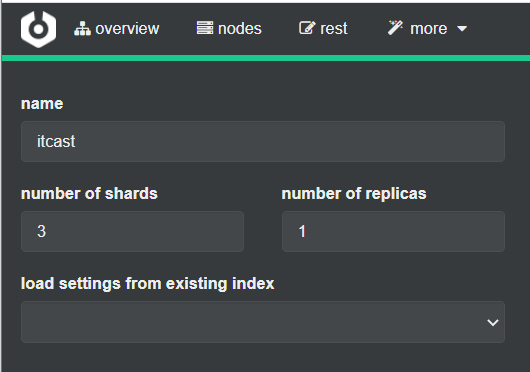
image-20221007231425360
查看分片效果
回到首页,即可查看索引库分片效果
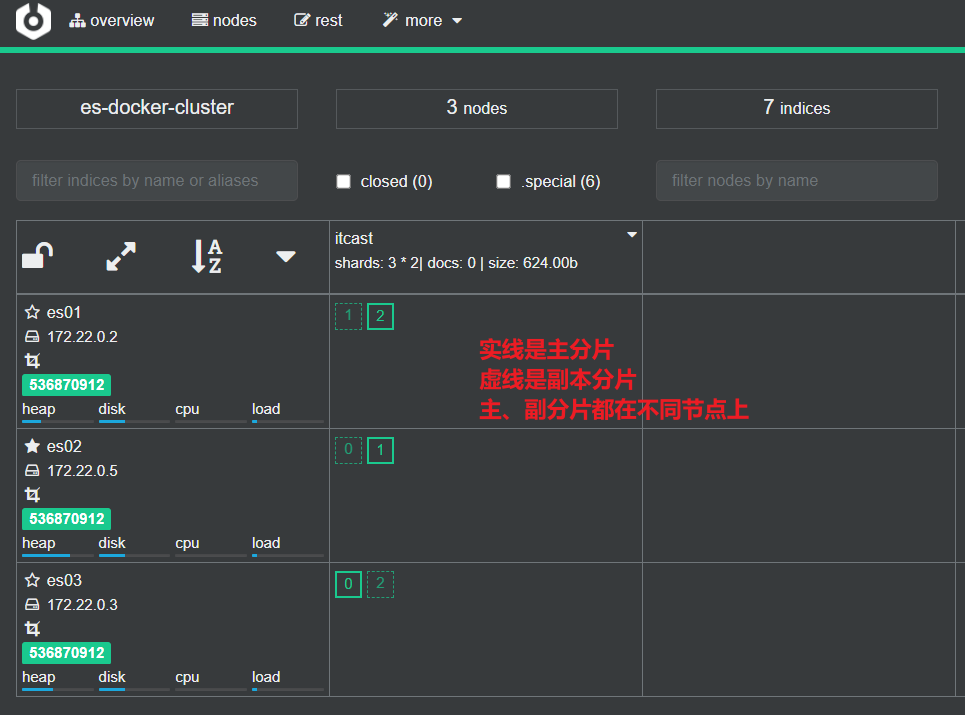
image-20221007231605228
集群脑裂
职责划分
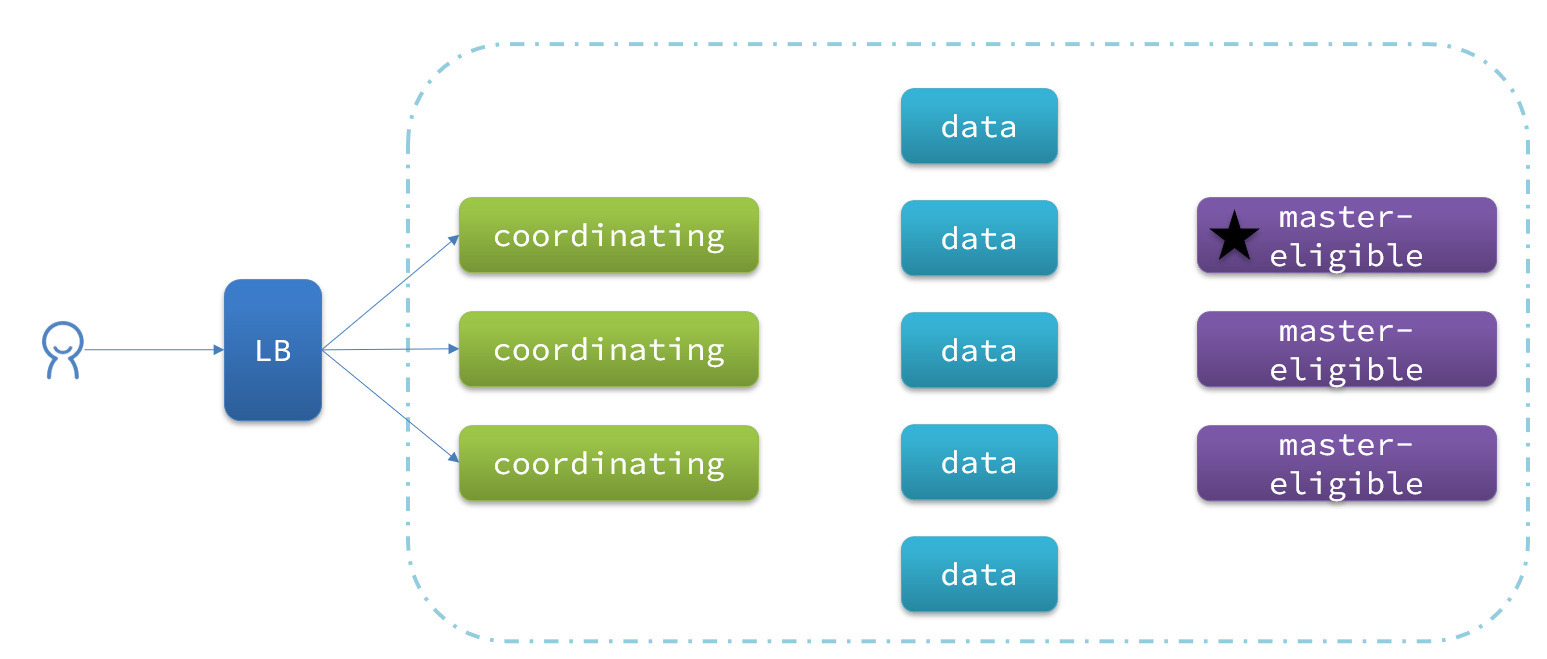
elasticsearch中集群节点有不同的职责划分:
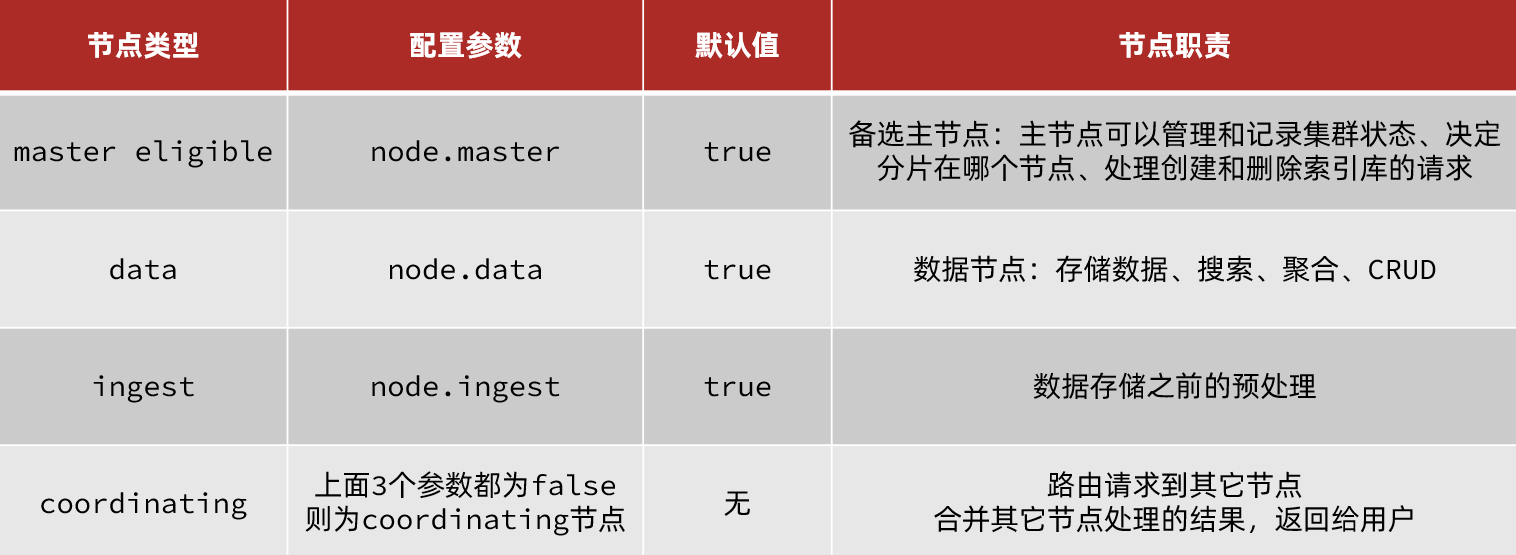
默认情况下,集群中的任何一个节点都同时具备上述四种角色。
但是真实的集群一定要将集群职责分离:
- master节点:对CPU要求高,但是内存要求第
- data节点:对CPU和内存要求都高
- coordinating节点:对网络带宽、CPU要求高
职责分离可以让我们根据不同节点的需求分配不同的硬件去部署。而且避免业务之间的互相干扰。
一个典型的es集群职责划分如图:
脑裂问题
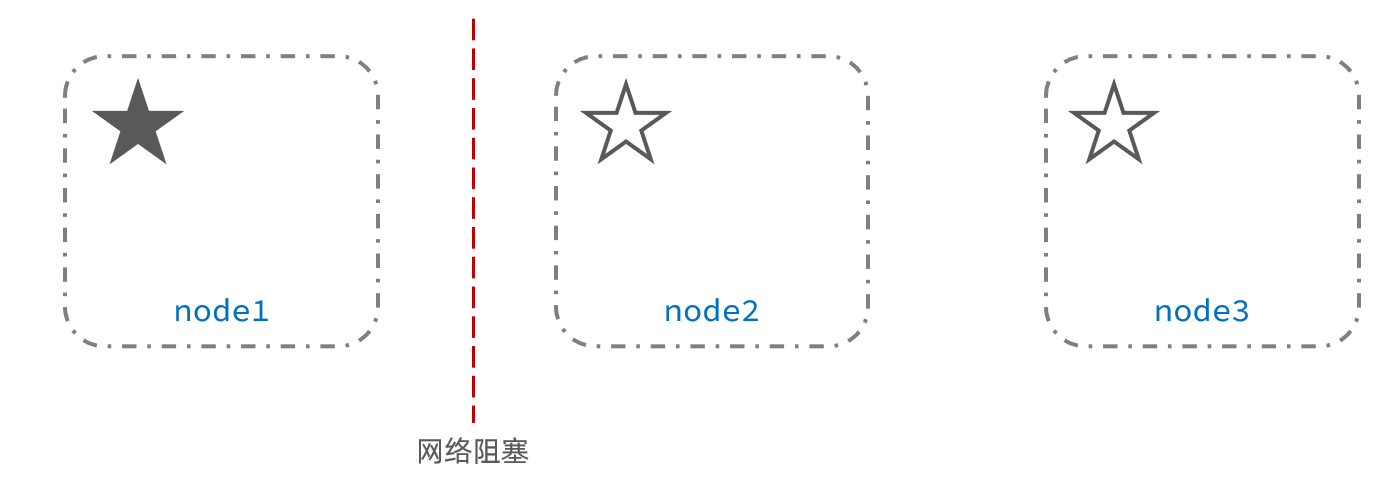
脑裂是因为集群中的节点失联导致的。
例如一个集群中,主节点与其它节点失联:
此时,node2和node3认为node1宕机,就会重新选主:
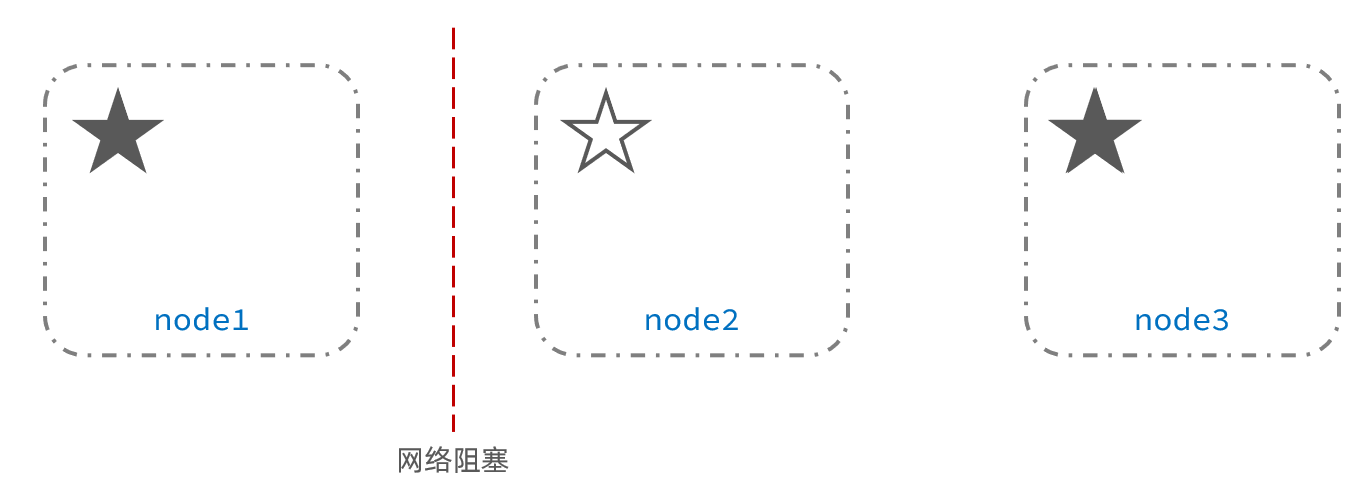
当node3当选后,集群继续对外提供服务,node2和node3自成集群,node1自成集群,两个集群数据不同步,出现数据差异。
当网络恢复后,因为集群中有两个master节点,集群状态的不一致,出现脑裂的情况:
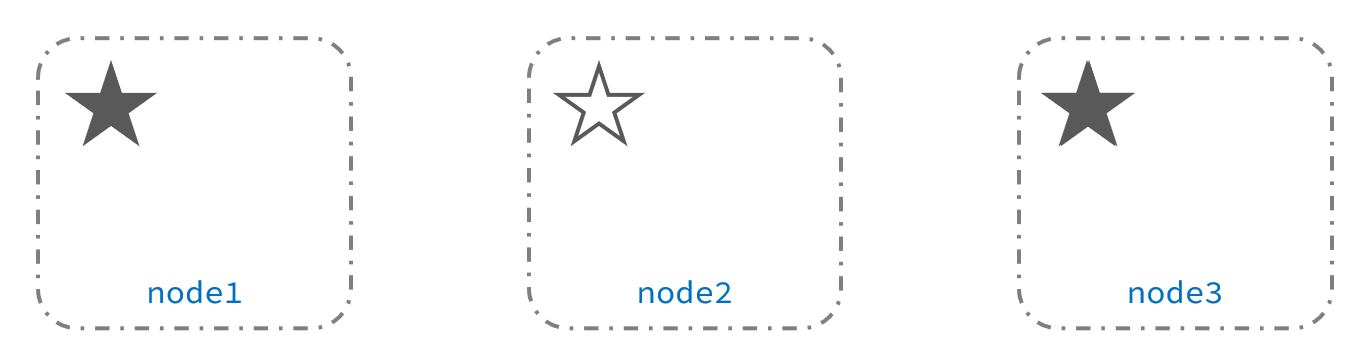
解决脑裂的方案是,要求选票超过 ( eligible节点数量 + 1 )/ 2 才能当选为主,因此eligible节点数量最好是奇数。对应配置项是discovery.zen.minimum_master_nodes,在es7.0以后,已经成为默认配置,因此一般不会发生脑裂问题
例如:3个节点形成的集群,选票必须超过 (3 + 1) / 2 ,也就是2票。node3得到node2和node3的选票,当选为主。node1只有自己1票,没有当选。集群中依然只有1个主节点,没有出现脑裂。
小结
master eligible节点的作用是什么?
- 参与集群选主
- 主节点可以管理集群状态、管理分片信息、处理创建和删除索引库的请求
data节点的作用是什么?
- 数据的CRUD
coordinator节点的作用是什么?
路由请求到其它节点
合并查询到的结果,返回给用户
分布式存储
插入三条数据:
POST /test/_doc/1
{
  "title":"试着插入一条,id = 1"
}

POST /test/_doc/3
{
  "title":"试着插入一条,id = 3"
}

POST /test/_doc/5
{
  "title":"试着插入一条,id = 5"
}
查询:
GET /test/test/_search
结果: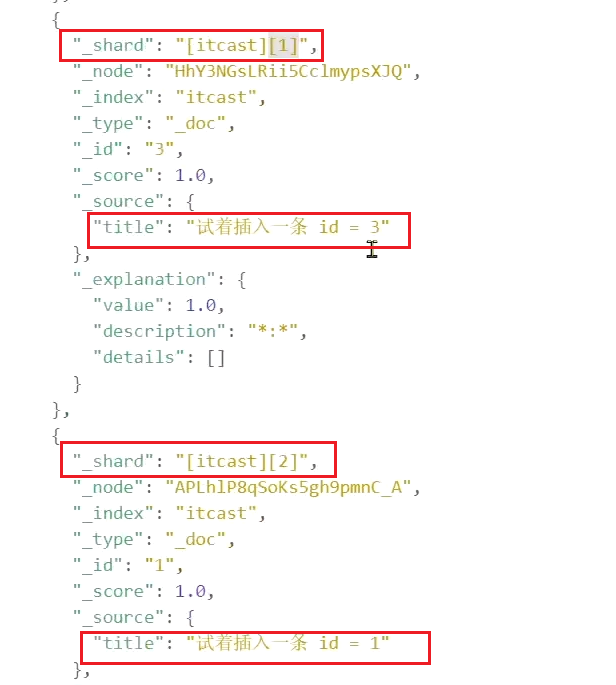
分片存储原理
elasticsearch会通过hash算法来计算文档应该存储到哪个分片:

说明:
- _routing默认是文档的id
- 算法与分片数量有关,因此索引库一旦创建,分片数量不能修改!
新增文档的流程如下: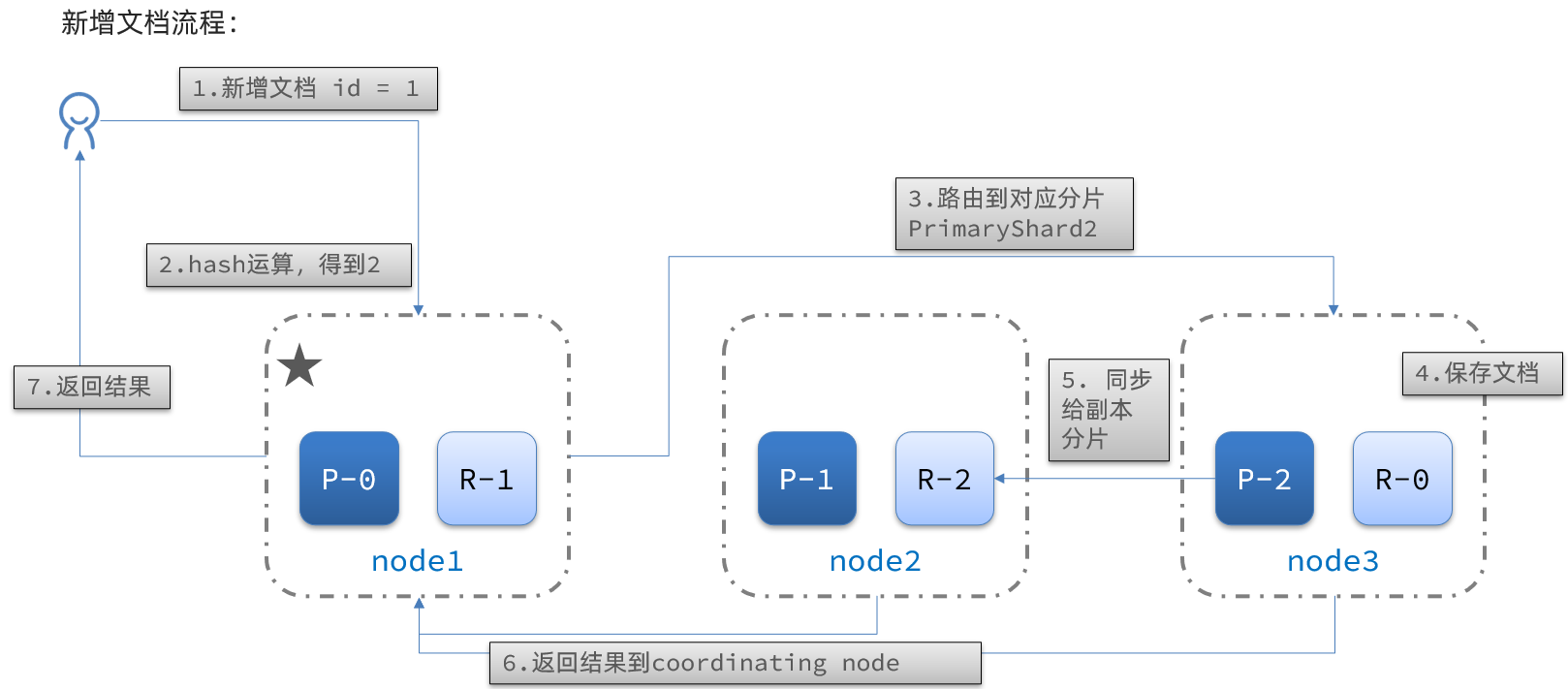
解读:
- 1)新增一个id=1的文档
- 2)对id做hash运算,假如得到的是2,则应该存储到shard-2
- 3)shard-2的主分片在node3节点,将数据路由到node3
- 4)保存文档
- 5)同步给shard-2的副本replica-2,在node2节点
- 6)返回结果给coordinating-node节点
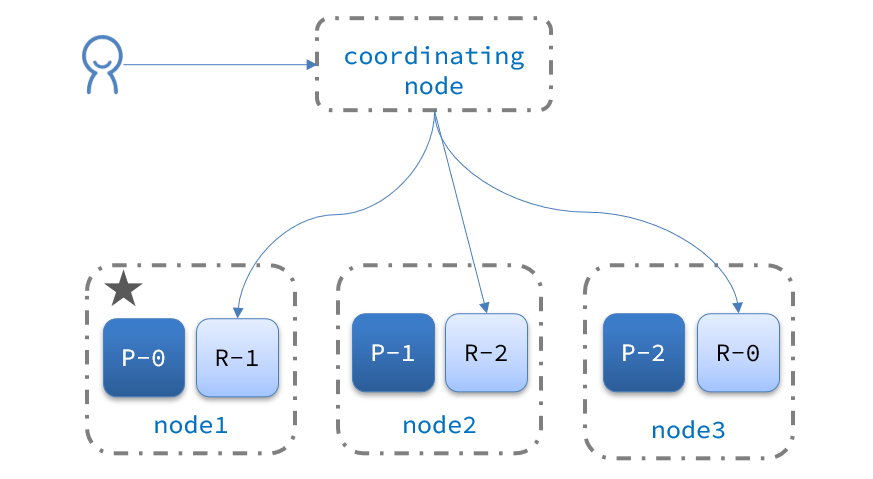
分布式查询
elasticsearch的查询分成两个阶段:
scatter phase:分散阶段,coordinating node会把请求分发到每一个分片
gather phase:聚集阶段,coordinating node汇总data node的搜索结果,并处理为最终结果集返回给用户
故障转移
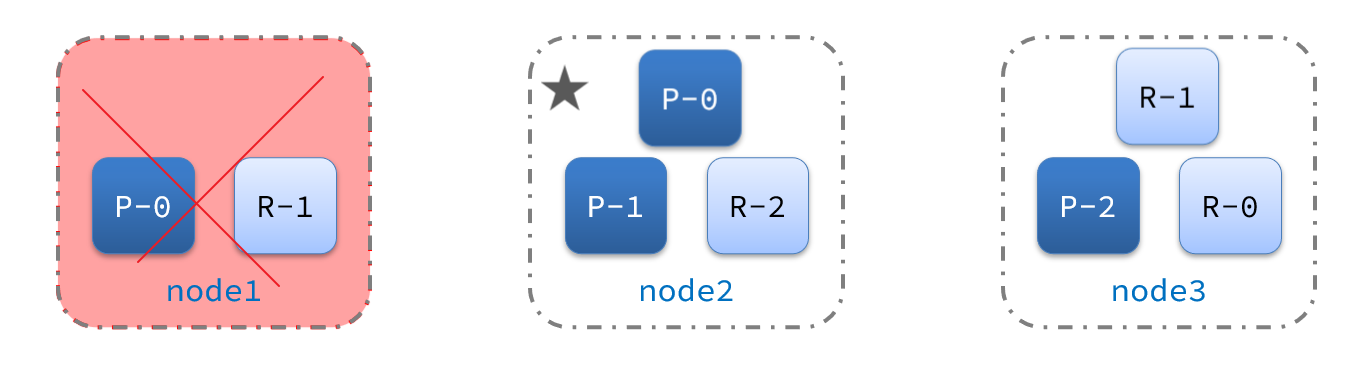
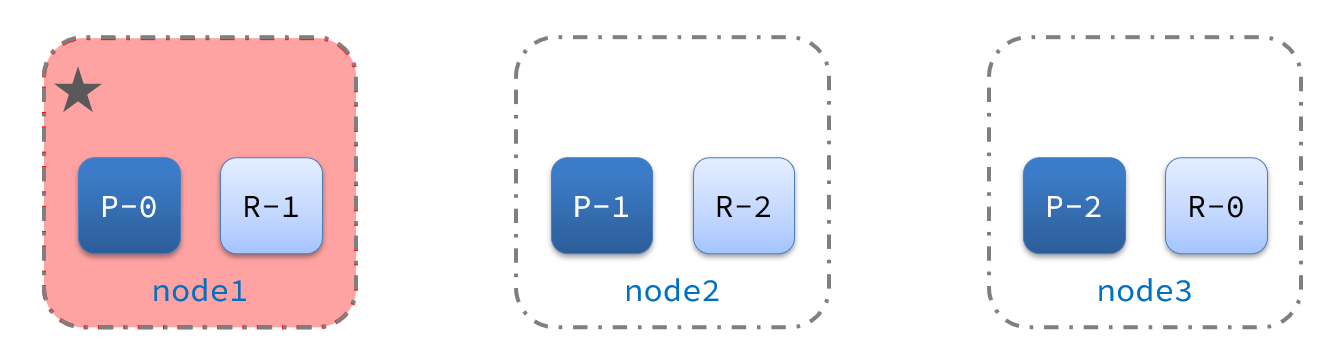
集群的master节点会监控集群中的节点状态,如果发现有节点宕机,会立即将宕机节点的分片数据迁移到其它节点,确保数据安全,这个叫做故障转移。
1)例如一个集群结构如图:
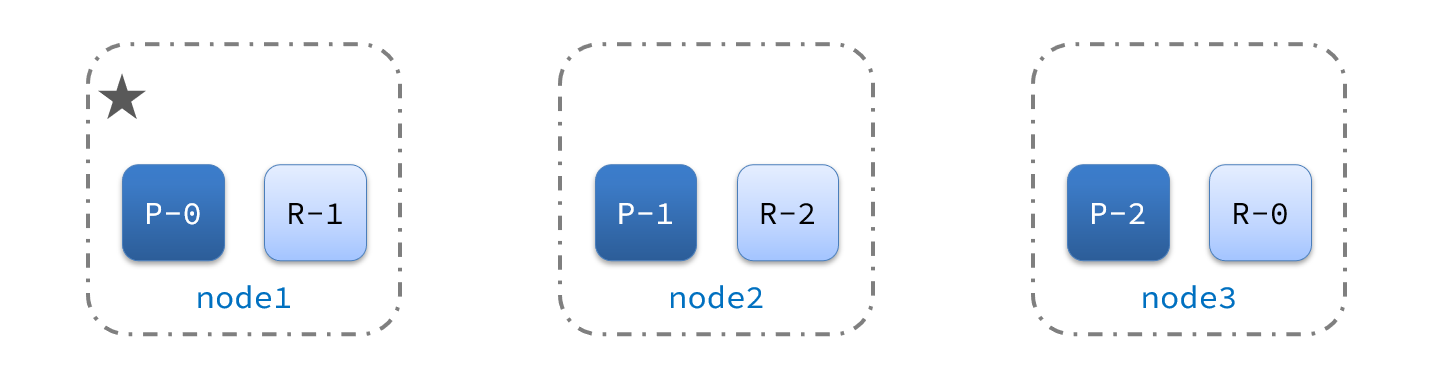
现在,node1是主节点,其它两个节点是从节点。
2)突然,node1发生了故障:
宕机后的第一件事,需要重新选主,例如选中了node2:
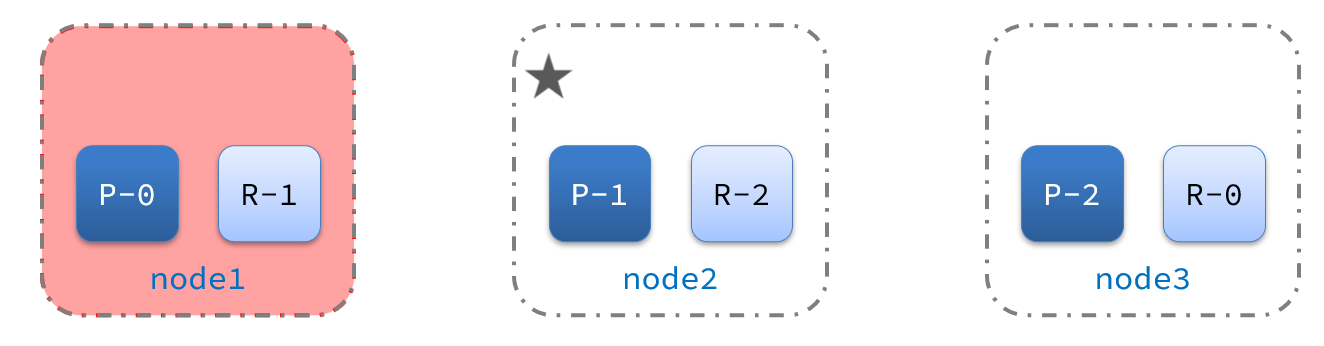
node2成为主节点后,会检测集群监控状态,发现:shard-1、shard-0没有副本节点。因此需要将node1上的数据迁移到node2、node3: