
Nginx 基础
Nginx 基础
概述
安装
常用版本
安装Nginx开源版
下载--上传--解压--进入nginx文件夹
./configure --prefix=/usr/local/nginx
#
make
make install
报错
checking for OS
+ Linux 3.10.0-693.el7.x86_64 x86_64
checking for C compiler ... not found
./configure: error: C compiler cc is not found

#安装c解析器gcc
yum install -y gcc
./configure: error: the HTTP rewrite module requires the PCRE library. You can either disable the module by using --without-http_rewrite_module option, or install the PCRE library into the system, or build the PCRE library statically from the source with nginx by using --with-pcre=<path> option. #安装perl yum install -y pcre pcre-devel./configure: error: the HTTP gzip module requires the zlib library. You can either disable the module by using --without-http_gzip_module option, or install the zlib library into the system, or build the zlib library statically from the source with nginx by using --with-zlib=<path> option. #安装zlib库 yum install -y zlib zlib-devel
启动
cd /usr/local/nginx/sbin

#启动
./nginx
#快速停止
./nginx -s stop
#优雅关闭
./nginx -s quit
#重新加载
./nginx -s reload
安装为系统服务
vim /usr/lib/systemd/system/nginx.service[Unit] Description=nginx - web server After=network.target remote-fs.target nss-lookup.target [Service] Type=forking PIDFile=/usr/local/nginx/logs/nginx.pid ExecStartPre=/usr/local/nginx/sbin/nginx -t -c /usr/local/nginx/conf/nginx.conf ExecStart=/usr/local/nginx/sbin/nginx -c /usr/local/nginx/conf/nginx.conf ExecReload=/usr/local/nginx/sbin/nginx -s reload ExecStop=/usr/local/nginx/sbin/nginx -s stop ExecQuit=/usr/local/nginx/sbin/nginx -s quit PrivateTmp=true [Install] WantedBy=multi-user.target#重新加载系统服务 systemctl daemon-reload systemctl start nginx.service ps -ef | grep nginx systemctl enable nginx.service
目录结构
- 后缀为_temp的目录存放的都是临时文件
- conf配置文件目录
- nginx.conf 默认的主配置文件
- html 存放静态文件的默认目录
- 50x.html 报错50*后的页面
- index.html 默认首页
- sbin :存放nginx的主程序
tree /usr/local/nginx
/usr/local/nginx
├── client_body_temp                 ## POST 大文件暂存目录
├── conf                             ## Nginx所有配置文件的目录
│   ├── fastcgi.conf                 ## fastcgi相关参数的配置文件
│   ├── fastcgi.conf.default         ## fastcgi.conf的原始备份文件
│   ├── fastcgi_params               ## fastcgi的参数文件
│   ├── fastcgi_params.default
│   ├── koi-utf
│   ├── koi-win
│   ├── mime.types                   ## 媒体类型
│   ├── mime.types.default
│   ├── nginx.conf                   #这是Nginx默认的主配置文件,日常使用和修改的文件
│   ├── nginx.conf.default
│   ├── scgi_params                  ## scgi相关参数文件
│   ├── scgi_params.default
│   ├── uwsgi_params                 ## uwsgi相关参数文件
│   ├── uwsgi_params.default
│   └── win-utf
├── fastcgi_temp                     ## fastcgi临时数据目录
├── html                             ## Nginx默认站点目录
│   ├── 50x.html                     ## 错误页面优雅替代显示文件,例如出现502错误时会调用此页面
│   └── index.html                   ## 默认的首页文件
├── logs                             ## Nginx日志目录
│   ├── access.log                   ## 访问日志文件
│   ├── error.log                    ## 错误日志文件
│   └── nginx.pid                    ## pid文件,Nginx进程启动后,会把所有进程的ID号写到此文件
├── proxy_temp                       ## 临时目录
├── sbin                             ## Nginx 可执行文件目录
│   └── nginx                        ## Nginx 二进制可执行程序
├── scgi_temp                        ## 临时目录
└── uwsgi_temp                       ## 临时目录
基本运行原理
用户 ---> 通过网络向nginx服务器发送请求(http://192.168.10.105/index.html)
---> nginx服务器开启sbin/nginx可执行文件
---> 开启主进程Master,读取并校验配置文件
---> 开启子进程Worker接收请求
---> Worker解析请求,读取文件
---> 做出响应
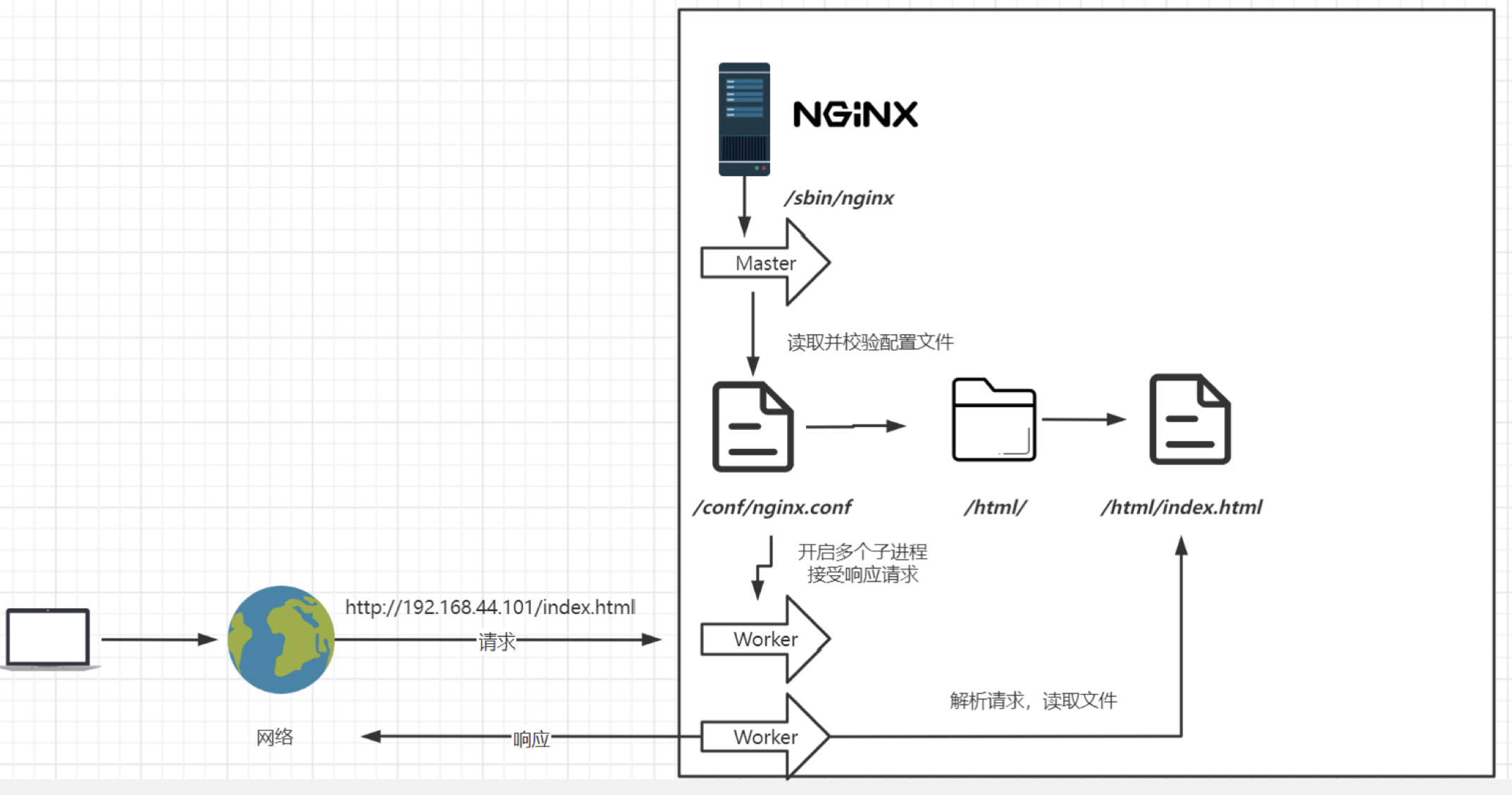
配置
最小配置
worker_processes  1; #默认为1,表示开启一个业务进程,和硬件有关,不超过内核数
events {
    worker_connections  1024; #单个业务进程可接受连接数,一般不用改
}
http {
    include       mime.types; #引入mime.types配置文件(定义http mime类型)
    default_type  application/octet-stream; #如果mime类型没匹配上,默认使用二进制流的方式传输
    sendfile        on; #高效网络传输,也就是数据0拷贝
    keepalive_timeout  65;  #保持连接超时的时间
    #虚拟主机配置
    server {
        listen       80; #监听端口号
        server_name  localhost; #主机名
        #匹配路径
        location / {
            root   html; #文件根目录
            index  index.html index.htm; #默认页名称
        }
        error_page   500 502 503 504  /50x.html; #报错后对应页面
        location = /50x.html {
            root   html;
        }
    }
}
server_name匹配规则:我们需要注意的是servername匹配分先后顺序,写在前面的匹配上就不会继续往下匹配
- 完整匹配:空格隔开,分号结尾,如
vod.botuer.com www.botuer.com; - 通配符匹配:如
*.botuer.com - 通配符后匹配:如
vod.* - 正则匹配:
~^[0-9]+\.botuer\.com$(~开始正则)
反向代理
反向代理:虚拟主机的路径匹配到后不指向文件,而是通过 proxy_pass 代理到服务器
worker_processes  1; #默认为1,表示开启一个业务进程,和硬件有关,不超过内核数
events {
    worker_connections  1024; #单个业务进程可接受连接数,一般不用改
}
http {
    include       mime.types; #引入mime.types配置文件(定义http mime类型)
    default_type  application/octet-stream; #如果mime类型没匹配上,默认使用二进制流的方式传输
    sendfile        on; #高效网络传输,也就是数据0拷贝
    keepalive_timeout  65;  #保持连接超时的时间
    #虚拟主机配置
    server {
        listen       80; #监听端口号
        server_name  localhost; #主机名
        #匹配路径
        location / {
            proxy_pass http://www.botuer.com/;
            #root   html; #文件根目录
            #index  index.html index.htm; #默认页名称
        }
        error_page   500 502 503 504  /50x.html; #报错后对应页面
        location = /50x.html {
            root   html;
        }
    }
}
负载均衡
worker_processes 1;
events {
    worker_connections 1024;
}
http {
    include 		mime.types;
    default_type 	application/octet-stream;
    sendfile		on;
    keepalive_timeout	65;

    ## 配置负载均衡权重
    upstream myfzjh {
        server 42.193.100.99 weight=3;
    	server 192.168.10.106 weight=1;
    }
    server {
        listen		80;
        server_name	localhost;
        location / {
            proxy_pass http://myfzjh;	## 使用负载均衡
        }
    }
}
除了weight还有几个不常用的
down 用于崩的服务器不参与分配,基本用不到(需要重新加载配置文件)
backup 候补(其他 忙/down 时参与),基本用不到(需要重新加载配置文件)
轮询的方式无法保持会话,比如登陆获取的Cookie轮询到其他服务器Cookie丢失,nginx提供了几种方式,但是基本都用不到
- ip_hash:定向用户转发,同一个ip地址转发同一台服务器,可以保持会话,但是用户一旦流动,ip地址可能发生变化
- least_conn:最少连接访问,配置了权重,没有必要配置最少连接
- url_hash:定向流量转发,同一个请求地址转发到同一台服务器,根据用户访问的url定向转发请求,但是一旦url变化,就无法保持会话(注册一个页面,登录一个页面),用于同地址的大量请求资源不在同一服务器
- fair:根据后端服务器响应时间转发请求,某请求资源所在服务器转换机过热,长时间得不到响应,就转发到另一台服务器,但是这样会给新的服务器带来巨大压力,可能也会崩掉,而且还需要第三方插件
怎么解决会话问题和动态上下线服务器呢,Lua
动静分离
worker_processes  1;
events {
    worker_connections  1024;
}
http {
    include       mime.types;
    default_type  application/octet-stream;
    sendfile        on;
    keepalive_timeout  65;

    server {
        listen       80;
        server_name  localhost;
        location / {
            proxy_pass http://192.168.10.106;
        }
        #配置静态资源
        location ~*/(css|js|img|fonts|images|error){
            root   /usr/local/nginx/static;
            index  index.html index.htm;
        }
        error_page   500 502 503 504  /50x.html;
        location = /50x.html {
            root   html;
        }
    }
}
location中root是用来指定根目录的,不能出现重复的目录层级,如想拦截
/ga4/assets开头的,或.*\.(js|css)?$结尾的匹配到/www/wwwroot/love.botuer.com/location ~ .*\.(js|css|jpg)?$ { root /www/wwwroot/love.botuer.com/; } ## 切记不能重复文件夹 location ~ /ga4/assets { root /www/wwwroot/love.botuer.com/ga4/assets; ## 错了 }root 就是在指定域名后的uri对应的根目录,会自动拼接带上uri
而 alias 则会去掉重复的部分,或者说是替换掉location匹配的路径
location 前缀
/:通用匹配,任何请求都会匹配到=:精准匹配~:正则匹配,区分大小写~*:正则匹配,不区分大小写^~:不以正则匹配
location 匹配
- 多个正则location直接按书写顺序匹配,成功后就不会继续往后面匹配
- 普通(非正则)location会一直往下,直到找到匹配度最高的(最大前缀匹配)
- 当普通location与正则location同时存在,如果正则匹配成功,则不会再执行普通匹配
- 所有类型location存在时,“=”匹配 > “^~”匹配 > 正则匹配 > 普通(最大前缀匹配)
root和alias
3)使用alias标签的目录块中不能使用rewrite的break(具体原因不明);另外,alias指定的目录后面必须要加上"/"符号!!
4)alias虚拟目录配置中,location匹配的path目录如果后面不带"/",那么访问的url地址中这个path目录后面加不加"/"不影响访问,访问时它会自动加上"/"; 但是如果location匹配的path目录后面加上"/",那么访问的url地址中这个path目录必须要加上"/",访问时它不会自动加上"/"。如果不加上"/",访问就会失败!
5)root目录配置中,location匹配的path目录后面带不带"/",都不会影响访问。
location /css {
  alias   /usr/local/nginx/static/css;
  index  index.html index.htm;
}
URL重写
rewrite 	<regex> 	<replacement> 	[flag];
关键字 		正则 			替代内容 		flag标记
- rewrite 可放在:server,location,if
- regex :正则匹配需要替换的url,假的
- replacement:替代的内容,替换成后端真实的
- flag
- last:本条规则匹配完成后,继续向下匹配新的 location 规则,规则指的是location
- break:本条规则匹配完成即终止,不再匹配后面的任何规则,即优先级比较高
- redirect:返回302临时重定向,浏览器地址会显示跳转后的URL地址
- permanent:返回301永久重定向,浏览器地址栏会显示跳转后的URL地址
- 正则匹配时,将一部分用括号括起来可以作为参数,传给后面真实的(替换的)的内容
- 我们想匹配一个:数字.html 这种格式的正则一般这样写
^[0-9]+.html$ - 后面替换到真实地址需要用到具体哪个数字,需要传递过去,那就需写成
^([0-9]+).html$,即给需要传递的内容加上括号 - 后面接收的时候用$后接第几个参数,如
/list?pageNum=$1
- 我们想匹配一个:数字.html 这种格式的正则一般这样写
worker_processes  1;
events {
    worker_connections  1024;
}
http {
    include       mime.types;
    default_type  application/octet-stream;
    sendfile        on;
    keepalive_timeout  65;
    server {
        listen       80;
        server_name  localhost;
        location / {
            rewrite ^/([0-9]+).html$  /index.jsp?pageNum=$1    break; #重写URL
            proxy_pass http://192.168.10.106;
        }
        location ~*/(css|js|img|fonts|images|error){
            root   /usr/local/nginx/static;
            index  index.html index.htm;
        }
        error_page   500 502 503 504  /50x.html;
        location = /50x.html {
            root   html;
        }
    }
}
内网拦截
配置业务服务器防火墙,只允许 192.168.44.101 (Nginx服务器)访问
#开启防火墙
systemctl enable firewalld
systemctl start firewalld
#添加规则:指定ip和端口访问
firewall-cmd --permanent --add-rich-rule='rule family="ipv4" source address="192.168.44.101" port protocol="tcp" port="8080" accept'
#重载规则
firewall-cmd --reload
#查看已配置规则
firewall-cmd --list-all
#移除规则
firewall-cmd --permanent --remove-rich-rule='rule family="ipv4" source address="192.168.44.101" port port="8080" protocol="tcp" accept'
Nginx服务器配置:进来的请求通过反向代理到内网业务服务器
worker_processes  1;
events {
    worker_connections  1024;
}
http {
    include       mime.types;
    default_type  application/octet-stream;
    sendfile        on;
    keepalive_timeout  65;
    upstream myfzjh2 {
        server 192.168.44.102 weight=8 down;
        server 192.168.44.103:8080 weight=2;		#注意端口号相对应
        server 192.168.44.104:8080 weight=1 backup;	#注意端口号相对应
    }
    server {
        listen       80;
        server_name  localhost;
        location / {
            rewrite ^/([0-9]+).html$  /index.jsp?pageNum=$1 redirect; #重写URL
            proxy_pass http://myfzjh2;
        }
    }
}
防盗链
- 通过请求头中的referer判断请求的来源,在单独访问资源的时候是没有referer的,只有在页面中发起的请求才会携带这个请求头
- 实际生产中 valid_referers 后跟域名,但是就无法直接访问资源(没有referer的情况),所以需要再加一个 none
- 通过
$invalid_referer获取校验结果,if后面一定要加空格 - 处理方式
- 直接返回错误码
return 401; - 返回错误页面
return 401.html;,后面需要配置页面的location - 重写到一个图片
rewrite ^/ img/401.png break;
- 直接返回错误码
worker_processes  1;
events {
    worker_connections  1024;
}
http {
    include       mime.types;
    default_type  application/octet-stream;
    sendfile        on;
    keepalive_timeout  65;
    server {
        listen       80;
        server_name  localhost;

        location /images{
            valid_referers 192.168.10.105 192.168.10.107 none; #允许访问
            if ($invalid_referer) { #其他重写地址
                rewrite ^/ img/xxx.png  break;
            }
            root   /usr/local/nginx/static;
            index  index.html index.htm;
        }
        error_page   500 502 503 504  /50x.html;
        location = /50x.html {
            root   html;
        }
    }
}
正向代理
proxy_pass $scheme://$host$request_uri;
resolver 8.8.8.8;
代理https需要第三方模块
https://github.com/chobits/ngx_http_proxy_connect_module
server {
    listen 3128; # 正向代理监听的端口

    # 允许CONNECT方法, 建立隧道
    proxy_connect;
    proxy_connect_allow 443; # 允许代理到 443 端口
    proxy_connect_connect_timeout 10s;
    proxy_connect_read_timeout 10s;
    proxy_connect_send_timeout 10s;

    # 定义代理行为
    location / {
        resolver 8.8.8.8; # 使用 Google DNS 解析域名
        proxy_pass $scheme://$http_host$request_uri;
        proxy_set_header Host $http_host;
    }
}